Monday, July 18, 2016

Oracle Learn Cloud 16B: Release features

Oracle Learn Cloud (Taleo Learn) v16B will be available on July 22nd, 2016. The release content document can be found in the below link:
http://www.oracle.com/webfolder/technetwork/tutorials/tutorial/cloud/taleo/16B_learn_rcd.htm

A quick summary of the new features:

  1. New supervisor role feature: One common role to maintain supervisor permissions. This role will also be assigned to all users mapped as supervisors. For existing implementations with an integration to bring in users into Learn, you will need to do an impact analysis of how this new role will affect the permissions assigned to supervisors brought in by integration.
  2. Search and Skill widgets: Continuing investment in the new "widgets" feature, 16B will see two new widgets - Search and Skill. The new widgets present an opportunity for existing implementations to provide a more modern user interface for some of the existing features. Most Learn customers will be having a "Search" feature, utilising the tradtional LearnCenter Search Dynamic Object. Evaluate the new widgets to see how the existing pages can be redesigned to incorporate the new widgets.
  3. OOTB user interface between Learn and TBE: An out of the box interface is now provided for customers using TBE to bring over user data to Learn. Note that there is a significant change in the integration strategy for new Learn projects with the adoption of REST API services. While this does not affect existing customers for the moment, current and future implementations will need to consider the impact of this change.
  4. General availability of the new SCORM course player: A new course player was introduced in earlier releases, with support for HTML 5 content. This has now emerged from BETA and is available for courses launched from the "Learning Plan", "Tasks" and "Transcript" widgets.
If you are an existing Learn customer, review the release content documents and carry out a release impact analysis at the earliest. As always, make use of the robust community in Customer Connect to raise any questions or issues you have during the upgrade.

Monday, July 4, 2016

T3: Things to note while using the "Title by Manager" field in your requisition form

So, your hiring manager raises a requisition and wants to put an internal reference for the job title. For this purpose, Oracle Talent Acquisition cloud provides a field called "Title by Manager". This field is purely used for internal reference and not posted out as the requisition title. Except, in one scenario.
Note that if the Requisition Title field is left empty and if the "Title by Manager" field has been filled up, the Requisition Title field automatically takes the values in the Title by Manager field on save. This will happen, even though Requisition Title is a mandatory field. This opens up the slight risk of the requisition title getting its value directly from title by manager, which can be undesirable at times. Do keep this constraint in mind while designing your requisition form!

Sunday, June 26, 2016

End of Life alert: Business Intelligence for Taleo Enterprise Edition

A note as we are half way through 2016 - Business Objects for Taleo Enterprise Edition will reach it's end of life by 31st December, 2016. So, if you are a Taleo customer still using Business Objects, do plan your move to Oracle Business Intelligence (OBI). There is a wealth of information on OBI available on customer connect here

Friday, June 24, 2016

The Weekend T3: How to print multiple education and work experience entries in a correspondence

So, your customer asks you to design a correspondence that prints out all the work experience and education entries of a candidate from Taleo Enterprise Edition. How do you go about it?

Work Experience is one of the data elements in Taleo that can have multiple entries  per entity

So, you access the Message Templates configuration and look up the available variables related to a candidate's education and work experience. You will see something as below:

Correspondence variables for repeating elements like work experience is indexed
Notice the array index indicator within [] for these variables? These appear only for those variables that have multiple entries for an application, like Education, Work Experience, References, Pre-screening question etc.
You will notice that only variables for the first work experience/education entries are available in the list of variables (eg. {Application.Experiences[1].Employer}). In this case, how do you print other entries in a correspondence?

Even though additional array index entries are not provided in the list of variables, you can use the appropriate array index numbering to print additional entries. For eg. if you wanted to print up to the first 3 employers of a candidate's application, use the below variables:
{Application.Experiences[1].Employer}
{Application.Experiences[2].Employer}
{Application.Experiences[3].Employer}

So, that's the quick tip for the week. If there are specific topics you want me to cover in the Tips and Tricks column, just drop a comment. Stay tuned for more and have a nice weekend.

PS: In case you were wondering, T3 = Taleo Tips and Tricks

Friday, June 17, 2016

Driving field level validations in Taleo using Javascript API

The Javascript API available in Oracle Talent Acquisition Cloud can be utilised to drive field level validations and calculations. This is especially useful in the offer process, where specific offer components can be auto-calculated based on the base salary. The paper looks at the framework in general and illustrates the application of the same with an example scenario.


Friday, June 10, 2016

Learning Plans - The Swiss Army Knife of Oracle Learning Cloud

Jim manages the Learning & Development team of a large automobile component manufacturing company with a 10,000+ workforce. They have manufacturing plants across 5 locations in Asia, with sales and service offices spread across 20 countries. One of the critical KPIs of the L&D function is to administer multiple mandatory courses with varying eligibility and completion rules. One of his biggest challenges is to deliver Health and Safety compliance certification to over 3,000 employees and contractors working in the manufacturing plants. All these workers have to certify themselves after viewing 3 eLearning courses every 6 months and all new workers have to complete this within the first week of their assignment to the plants. While this is monitored on a weekly basis by site HRs, Jim keeps a constant tab of any non-compliance using their global LMS.

So, if you were to implement Oracle Learning Cloud (Taleo Learn) for Jim, how would you handle this requirement?

Enter Learning Plans


Learning Plans is the swiss army knife of Taleo Learn. Brandish it to deliver any type of program/curriculum based learning. Think of Learning Plan as a container that can pack different types of learning items for specific purposes.
Learning Plans - The Swiss Army Knife of Oracle Learning Cloud

 Let's take the case of Jim to illustrate this. His new hire health and safety training involves a set of 3 eLearning courses that need to be completed within a week of being assigned to the employees. Learning Plan is a way of packaging these 3 courses in one set, setting the required deadline, reminders, notifications and assigning it to required employees. For new employees in sales, Jim has a much larger Learning Plan that involves the new hires attending class room based orientations and field assignments. A Learning Plan can effectively combine multiple types of learning items like eLearning, Class room based training, tests and assessments, offline learning etc.

Auto-Enrollment through Groups

One key element of the Learning Plan functionality is the ability to auto-enroll employees into Learning Plans using dynamic groups. So, Jim can define rules to auto-enroll all manufacturing new hires into the Health and Safety Learning Plan, while to move all Sales new hires into the Sales Learning plan. While reducing the administrative overhead is a benefit brought in by this auto-enrollment feature, a more strategic advantage is the ability to push employees into specific Learning Plans based on their attributes. For eg. let's say you have a Future Manager learning path where high potential employees are enrolled into. Once you identify an employee as eligible for this program in Learn (will need a custom field to indicate this), he/she can be automatically enrolled into the Future Manager Learning Plan.

Well, but remember that Jim also has to assign this plan every six months to his manufacturing employees? How do we do that?

Enter Recurring Learning Plans.....Learning Plans reloaded!
In v16A of the product, Oracle has introduced an enhancement to the Learning Plan feature. Now you can define Learning Plans as "Recurring"
Recurring Learning Plans can be defined to handle recurring learning needs
This feature gives you the ability to recur a Learning plan within a specific interval (defined in days or months) as well as sent reminders before the Learning Plan is to expire. This key enhancement is exactly what customers like that of Jim in industries with heavy compliance requirements will be looking for.

All in all, Learning Plans is an extremely powerful feature that can be creatively used to meet a number of functional use cases. I am sure you will have lot of fun exploring this feature further.

Thursday, June 2, 2016

Kirkpatrick Model Level3 evaluation in Taleo Learn

One of the most common models used for measuring training effectiveness is the Kirkpatrick Model. This model measures four levels of training effectiveness as shown below:

The four levels of evaluation in Kirkpatrick Model

Measurement of first and second levels is straightforward and can be easily handled in Taleo Learn. Level 3 measures the impact of training on performance of the employee/degree of behavioral change. Typically, these are measured after the training and involves the employee's supervisor who provides a feedback on the observed impact on performance of the training.

Taleo Learn facilitates Level 3 measurement using the concept of "Delayed Surveys". Delayed Surveys can be used to send out an evaluation form or survey to an employee's manager, specific number of days after the completion of an Instructor Lead Training session. The steps to setup a Delayed Survey is as below:

1. Create a new assessment with type of "survey" and define the questions that need to be part of the Level 3 evaluation.
2. Once the assessment has been created, create a survey as shown below, where you can mention the number of days after the course completion when you need the survey to be sent out.

Setup of a delayed survey requires you to fil up the "Number of days to delay survey delivery" option

3. Select the assessment created in step 1 and attach to the "Supervisor Survey" option on the above page. This will send out the selected survey questionnaire to the employee's supervisor
4. Add the Delayed Survey dynamic object on your Learn homepage, so that managers can view any delayed survey that has been sent to them.
5. Enable reports to view results of the Level 3 survey provided
6. Review notifications related to delayed survey and enable/modify as required.

As they say, 'you can't manage what you can't measure' and the measurement of impact of training on day to day job performance of an employee is a critical performance index for any organization. While delayed surveys is a powerful mechanism to measure this, you can also look at extending L3 measurement to performance reviews, development conversations and your employee surveys.

Monday, May 30, 2016

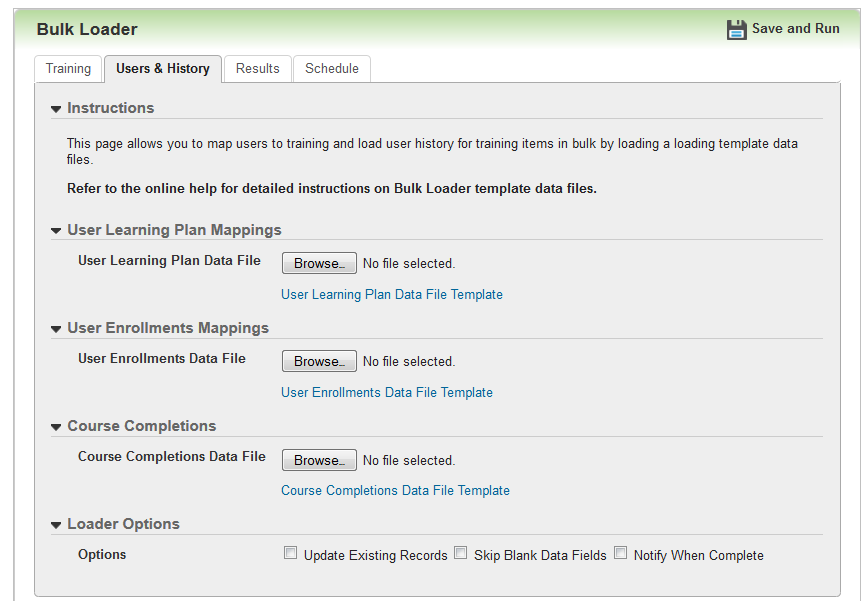
On the Bulk Loader feature in Taleo Learn

With thousands of enrollments, mass updates of attendance, mass creation of courses etc. Learning Management is easily one of the most transaction intensive of HR processes. Let's look at some of the business scenarios where mass transactions are involved in a typical learning management process:

1. Instructor Lead Training schedule/calendar to be updated in the LMS
2. Enrolling all new hires into a compliance course
3. Updating attendance of all employees who attended an Instructor Lead Training session
4. Enrolling High Potential employees into a Leadership development program
5. Migration of learning history from a previous LMS

To cater to such requirements of mass transactions, Oracle Learning Cloud (Taleo Learn) introduced the 'Bulk Loader' features few releases back. The bulk loader feature which started off with options to mass create Instructor Lead Trainings (ILTs), has been significantly expanded in the latest release to cover the following functionalities:

a. Create/Update ILT events, tracks, sessions, enrollment
b. Create Learncenter authored courses
c. Map items to categories
d. Manage pre and post-enrollment status of employees
e. Map employees to Learning Plans
f. Manager course completion status of employees

Bulk Loader is available in the Configuration center of Oracle Learning Cloud, allowing L&D administrators to carry out these transactions directly from the web UI. The tool is extremely intuitive as it works like a guided process and provides file templates to be used as well. L&D Administrators should be able to utilise this with minimal or almost no training (which is what cloud solutions are all about).

This feature brings in important considerations from an implementation standpoint as well:

1. Now, partners and customers will be able to carry out migration of training history into Oracle Learning Cloud, without depending on Oracle Consulting. This was earlier restricted only to Oracle Consulting, but bulk loader opens this up for the partner ecosystem, which is great!

2. Post-enrollment status can be updated using bulk loader now. This addresses the need to update 'attendance'/'completion' details of Instructor Lead Trainings. Note that bulk loader can also be scheduled now, bringing in the possibility to automate the updation of post-enrollment statuses in case attendance for a class is tracked externally.

3. A good amount of the initial ILT setup, typically done during the cutover to the product can now be managed through bulk loader.

4. Ensure that the L&D Administrators are fully aware of this feature as this will help to minimise administrative overheads during operations. L&D Admins should love this feature as it involves zero technical overhead!

All in all, this is a great addition to the product which should be utilized by implementation consultants and L&D Administrators alike. 

Thursday, December 24, 2015

Transcript widget in Taleo Learn v15C

One of the key themes of Taleo Learn product roadmap is the modernization of dynamic objects, with the introduction of widgets that are responsive in design.The first widget for Learning Plan was introduced in v15A.
In 15C,  a new widget for Transcript has been released. The Transcript Widget can be used to display the Learning History of an employee. As expected, it also has a feature to extract the Learning history to file. 
The need to display an employee's Learning history is a standard requirement in all LMS implementations. Prior to the introduction of the Transcript widget, a Learning history page could be developed in Taleo Learn using a combination of multiple dynamic objects. 
The new widget is a definite improvement for the product, providing an easy way to display Learning history with an improved UI and the ability to extract history to a file.
Let's take a closer look at the widget.

Configuration details
As with most other configuration items in Taleo Learn, the Transcript widget can be also be setup easily with few clicks.
Screenshot of Transcript widget setup
The primary design decisions will be around the type of leaning items that need to be displayed by the widget like Enrollments, Courses, Enrollments etc. This further gives you the ability to design pages displaying history of different learning items.
A feature to note is that the widget also gives the option to display the certificate achieved as well, in case a certificate was tied to the learning item in question.

Front-end display
The new widgets can only be used in the new Learncenter pages. But, it is possible to embed the new Learncenter pages in the traditional page designer as well. The below screenshot displays how the widget will be displayed in the Learncenter.
Screenshot of Transcript widget as shown to an end user
My POV and recommendation to customers
The new transcript widget with it's multiple features is a definite improvement and provides a quick way to display the training history of employees. Existing Taleo Learn customers should look at re-designing their existing Learncentre pages to include the new Transcript (as well as Learning Plan) widget and new customers should only be considering the new widgets for these functionalities. I hope that we will see more functionalities being released as widgets in the coming releases.

Sunday, September 6, 2015

Project Workacation - Why your next project location has to be a resort town!


Code, Pray, Love - Working away in Bali
Few years ago, I was reading a Quora post which asked whether being homeless is a good idea while bootstrapping to cut costs. I was intrigued by the top voted response (and the question as well) which recommended working in a low cost country, quoting his own example of working in Sa Pa in Vietnam. I thought this would be a fleeting idea, until I came across articles talking Bali becoming a startup hub!


Hubud is one of the first such co-working environments providing state of the art facilities in the beautiful island of Bali. Check out one of their teaser videos below:


This article profiles four other such startup co-working locations in Bali.

While most of these places have targeted startups, it got me thinking why such a work arrangement cannot be provided or explored for traditional corporate employees. Recent advances in telecommuting and collaboration technologies, shift of enterprise systems to cloud computing and an overall shift in work-life policies of organizations (in part driven by the millenial bug that seems to be affecting everything in HR policy these days!) makes this proposition a very attractive and practical one.
ROWE has been one of the most powerful ideas in work-life organization of late and studies have shown that employees are placing a higher premium on work-life balance and meaning. Considering all these factors, I believe that this idea of a workacation can be a strong element of employee engagement and attraction in the future, especially in the professional services industry. My proposition is to allow employees to work specific number of weeks in a year in specific co-working locations in vacation spots. Like Hubud, these co-working locations will be fully equipped for work, including internet connectivity, video conferencing facilities etc.

On the other side of the coin is the business potential to build such workacation locations in low cost countries. Brings to my mind, my own little picturesque town in southern India which is home to the famous backwaters of Kerala. May be some enterprising soul reading this piece will latch on to this idea and build such working pods in affordable vacation spots.

Backwaters of Kumarakom, Kerala, India

Hopefully, sometime in the future I will be blogging from one of these locations!!


Saturday, September 5, 2015

Adding a Widget into the Classic WYSIWYG Page editor in Taleo Learn

With 15A version of Oracle Learn Cloud (formerly Taleo Learn), Oracle has introduced the first version of widgets. Widgets are an alternative to the existing dynamic objects, presented with responsive page design and a much more slick UI. The first (and only) widget available with 15A/15B is the widget for Learning Plans. A sample is given below.


As documented, the widgets can be embedded only into the new page designer introduced with 15A and cannot be directly embedded into the classic WYSISYG pages. But, there is a workaround for you to achieve this. Follow the below steps:

1. Create the Widget
2. Create a Page and embed the Widget in the page
3. Open up the classic WYSIWYG page, where you want to invoke the widget
4. In the HTML section, add the below code:


For Page Number - give the page number generated in step 2
For PageName - give the page name provided in step 2

A sample is given below:

Friday, August 21, 2015

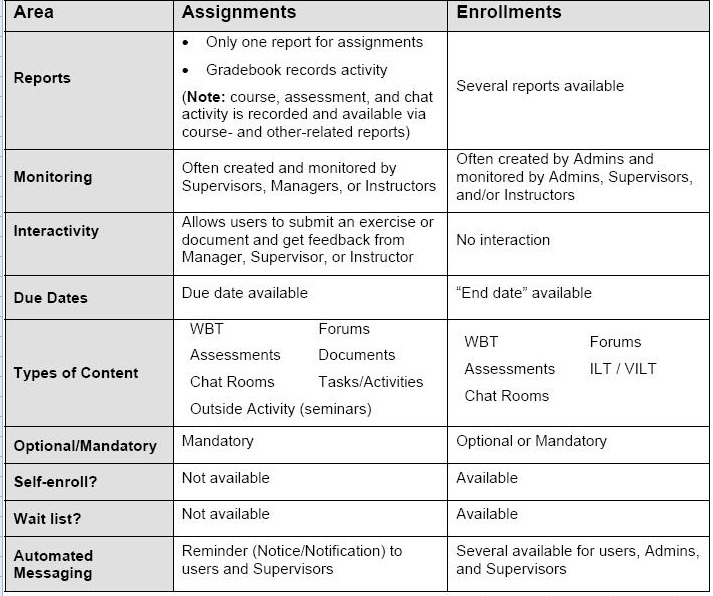
Assignments vs. Enrollments in Taleo Learn

Found this quick reference table in My Oracle Support, that gives an overview of the main differences between Assignments and Enrollments in Taleo Learn. Hope you find it informative!

Saturday, August 1, 2015

Capturing Training Interest in Oracle Learn Cloud


Training Needs Analysis is an integral part of most corporate learning and development strategy. While majority of the training needs are based on the overall organizational strategy and capabilities, it is important to gather individual training needs as well.

In this post we look at utilising the "Training Offerings" feature available in Oracle Learn cloud (formerly Taleo Learn) to enable training departments gauge interest for specific training items. 

Introducing the Training Offerings feature
Let's take the example of a Corporate Information Security compliance training that all employees need to complete within 3 months of joining a company. The company offers an online course as well as class room based training sessions for this. Employees can attend either the classroom training or the online course to complete the Information Security training. This is where Training Offerings come in. Training Offerings allow Learning and Development departments to bundle in multiple training methods into a single collection, giving employees the flexibility to take up the mode of training that suits them best and complete the overall training. 

Utilising Training Offerings to gauge employee training needs analysis
You can create a Training Offering without linking any learning items to it. This empty Training Offering can be opened up to employees to mark their interest in the offering. When a learning item is added to the training offering later on, the employees who showed their interest will be notified of the same. Similarly, the administrator of the Training Offering can view the employees who have shown interest for specific training offerings.

As shown in the image below, employees can indicate their interest for a potential training offering by clicking on the "envelope icon" next to an offering:


The image below shows the Administrator view of Training Offerings, where the administrator can view the employees who have expressed interest for a specific training offering


Post Note:
Driven by technology and workplace organisation changes, corporate learning is undergoing a tectonic transformation. In this new context where employees learn on the go and from sources far beyond the walls of a corporate learning system, where on-demand learning content can be generated - I would question the utility of a traditional training needs analysis itself. 


Oracle Learn Cloud - Adoption of Oracle Business Intelligence

Oracle Learn Cloud (formerly Taleo Learn) introduced Oracle Business Intelligence (BI) based reports from release 15A. BI Reports are in a beta release with existing Insight Reports still available for customers till end of 2015. With the upcoming Oracle Learn Cloud 15B release, Oracle also introduces the capability to define custom BI reports. For more information on Oracle Learn Cloud 15B release, follow this link.

Monday, July 6, 2015

Disabling "Apply" functionality in Taleo career sections

Quick tip of the day
A number of customers I've worked with have requested to disable the option to apply for internal jobs in a Taleo career section. Most often these customers have unique internal mobility processes that they prefer to retain in existing systems/processes. Yet, they want to use the internal career section feature of Taleo to post jobs and drive employee referrals. 
Another user case is industries where employees do not readily have access to computers or in certain cases do not even have a company e-mail address. In such scenarios, organisations just want to use the Taleo internal career section as a job board to let employees know of the available opportunities and do not want to drive electronic self-service application by employees.

So, how do we achieve this requirement of being able to refer friends on the internal career site without the capability for employees to apply for jobs?

Do not attach any application flow to the Job specific application flow configuration of a career section. If no job specific application flow is attached to a career section, the "Apply" button will not be displayed.
The below figure illustrates the career section configuration to achieve the above requirement.
Leave Job specific application flow blank to remove the "Apply" capability in a career section

Thursday, July 2, 2015

Fusion HCM R10 Release Highlights

Fusion HCM Release 10 documents are available now on the Release Readiness site. Check it out here for a preview of the upcoming features.
And bookmark the Release Readiness site as it's an extremely useful site.

Monday, June 29, 2015

On Oracle Taleo Career Sections

Career Sections is one of the most powerful features of Oracle Talent Acquisition cloud service (formerly known as Taleo). Career Sections are nothing but portals where open jobs are listed, allowing candidates to apply for jobs or refer friends to jobs (similar to the Candidate Gateway concept in PeopleSoft Recruitment module). Career Sections can be designed for internal and external candidates, as well as other participants in the recruitment process like staffing agencies. The flexibility of this feature lies in the fact that customers can design an unlimited number of career sections to cater to specific business scenarios. For eg. customers can have career sections for graduate and professional hires, for career fairs, recruitment events, for internal applications, for different subsidiaries etc.
Career Sections primarily control two aspects of the candidate experience: 

(1) Steps in the application process: This is called as "Application Flow" in Oracle Talent Acquisition Cloud terminology. The Application Flow controls the fields that need to be filled by a candidate during the application process. Every career site offers the capability to have up to 4 application flows: (a) Flow shown to candidates while applying for a job (b) Flow shown to candidates while referring friends to a job (c) Flow shown to candidates while depositing resume or creating a general profile (d) Flow shown to candidates while referring a friend's general profile
Different steps can be attached in the application flow for each of the above business cases. It is to be noted that the Application Flow is highly configurable and has a huge impact on the overall candidate experience. It is possible for us to design a lengthy application process or keep it simple by collecting critical information that will be helpful for screening candidates. Oracle Talent Acquisition cloud also provides the flexibility to break down the application process, where data from the candidate can be collected at different points in time during the selection process. For eg. it is possible to design an initial application form that collects basic candidate data and a supplementary form that collects additional data, which is sent out only to candidates who have cleared interviews. This level of flexibility provided by the product can be used to carefully tailor the overall candidate experience.
Given below are 2 examples of contrasting application flows that can be designed. The first example shows a short application flow which has only 3 steps, while the second application flow has 10 steps collecting most of the information upfront from candidates. 
While designing your application flow, consider the industry, competitive situation of your organisation and characteristics of your potential candidate pool to come up with the optimum application process. For eg. if you are in the technology space competing for millenial talent, it would be prudent to keep the application process short and collect only the most critical information upfront. On the other hand if you are targeting blue collar workers in a region with limited internet connectivity, collecting most information upfront will be a better strategy.

Example of a short application flow

Example of a long application flow


(2) Corporate branding of the career site: Each career section can have specific corporate branding applied. The branding feature can control the header, footer, background, colour, fonts, styles of different elements on the career section like buttons, hover effects etc. Oracle Talent Acquisition Cloud offers the ability for customers to upload branding files with customer specific cascading style sheets (CSS). In a number of implementations, career site branding is an area that is not given the time and importance it should be. The custom branding capabilities offered by the product is immense and can be utilised to provide a superior candidate experience. Given below are some selected examples of career sites running on Oracle Talent Acquisition Cloud, with excellent custom branding:
Additional Points:
  • The standard career section URL will be starting with zonename.taleo.net. Oracle offers a service (called Vanity URL service) which can be used to display a customer specific domain name in the career section URL, so as to eliminate reference to taleo.net
  • Career Sections also offer the capability to generate filtered URLs based on fields within the Oracle Taleo Acquisition suite. This eliminates the need to have multiple career sites for different locations or business units. For eg. let us take a requirement where you need to show jobs specific to a location, business unit or even job family to candidates. Instead of creating separate career sections for each of these categories, Oracle Talent Acquisition Cloud has the capability to generate filtered URLs for these parameters from the same career site.


Oracle Taleo Taleo Recruiting

The Unlearning Times and New Beginnings


After a long hiatus I am back to my blogging desk. The last two years has been a time of new learning and more importantly unlearning for me. The Software as a Service (SaaS) movement turned mainstream over the last two years and it's been an exhilarating experience riding the cloud wave. 
It has been a disruptive period for me; moving from a focus on PeopleSoft HCM to Oracle HCM Cloud suite of products, from projects delivered in years to delivery in weeks, from working on one or two projects at a time to handling multiple projects and more importantly adopting a cloud mindset in delivery. This period of unlearning has left me with little time and quality content to share with you all. I've always believed that it's important for me to write posts that matter, posts that give insights deeper than what the user guides provide. That comes only from experience. Two years into the new product suite and after being part of most of the initial Oracle HCM Cloud wins and implementations in the ASEAN region, I feel it's time for me to start sharing my learning and experience on the journey so far. And to all my PeopleSoft HCM friends - it's important to realise that the shift in HR Technology business and more importantly, the shift in customer preference for HR technology is REAL. Have an open mind and embrace the change!

Sunday, November 10, 2013

On Oracle delivered PeopleSoft HCM - Taleo Recruitment Integration

[Update July 2015] The delivered integration between PeopleSoft and Taleo Enterprise Edition is being deprecated and will not be supported by Oracle going forward. For customers who are currently implementing this solution, you will still be able to utilise the PeopleSoft objects related to this integration, but Oracle will not be providing product support for the same. Alternatively, you can utilise Taleo Bulk APIs or Taleo Connect Client to build out this integration.

Oracle has recently released pre-built integrations between PeopleSoft HCM and Taleo Enterprise Edition (TEE). These integrations will be available for new Taleo Recruitment customers who are on PeopleSoft HCM 9.1 and Peopletool 8.53+.
The following integration touchpoints are covered by this new feature:

1. Import of Organsations and Locations into Taleo from PeopleSoft.
2. Import of Requisition Templates into Taleo from PeopleSoft.
3. Import of Employee information into Taleo from PeopleSoft.
4. Export of 'Ready to Hire' candidates from Taleo to PeopleSoft.


Additionally, a new pagelet is also delivered in PeopleSoft, that will display open requisitions and candidate information from Taleo in PeopleSoft Manager Dashboard.

These integrations have been built on Taleo's SOAP based Web Service APIs and PeopleSoft's Integration Broker. Two new services at PeopleSoft, called -  TI_NEWHIR_CAND_DATA and TI_SETUP_EMPLOYEE_OB will handle the above integrations. 

Key Takeaways:
  • This integration is available for new Taleo customers, though Oracle will be considering controlled availability for existing Taleo customers.
  • The organisation and location structures in Taleo need to follow a specific hierarchy for this integration to work. Organisation structure has to be of 3 levels, namely Company, Business Unit and Department. Location structure has to be Country, State, City and Work Location. This rigidity in terms of the OLF structure in Taleo, may not suit a lot of customers and would be a key point in the evaluation of this functionality.
  • Customers can choose to turn on any of the available integrations in PeopleSoft. A new folder for Taleo Integration setup will be available under Setup HRMS > Common Definitions in PeopleSoft.
  • Requistion Templates in Taleo will be primarily driven out of Job Codes in PeopleSoft. Every valid combination of Company, BU, Department, Location and Job Code in PeopleSoft, that is included in the Taleo integration, will create a Requisition Template in Taleo.
  • 'Ready to Hire' candidates who are pulled from Taleo, will be populated in the 'Manage Hires' component in PeopleSoft. Creation of Personal/Job Data/Employment Instance can be carried out from the Manage Hires component.
  • PeopleSoft Candidate Gateway has the functionality to create requisitions from open positions in PeopleSoft. I did not see a mention of a corresponding functionality, where an open position in PeopleSoft triggers the creation of a requisition in Taleo. Hopefully, this should be in the roadmap!
  • This feature highlights the rich web service and file based integration capabilities of Taleo. Almost every object is exposed as a service in Taleo using SOAP based or CSV based integrations, thus greatly extending the functional capabilities of the product.
  • Considering that Taleo will be the recruitment module of Fusion Apps, a similar integration of Taleo Recruitment with EBS and Fusion HCM is also in the product roadmap.


Saturday, November 2, 2013

Oracle Cloud Marketplace: The App Store for Oracle Cloud and On Premise Applications

I have toyed around with the idea of an enterprise app store for PeopleSoft in the past. Succeed Consultancy in the UK has even built out a dedicated PeopleSoft app store.
Now, Oracle has come out with a dedicated App Store for Oracle applications, specifically targeted towards Oracle cloud applications.


In my opinion, an app eco-system is critical for cloud software vendors and it is heartening to see Oracle take an early plunge in this direction. As we stand at the cusp of a transition from traditional on-premise consulting models to rapid SaaS based implementations, the app marketplace provides an avenue for consulting SIs to tap into an alternate revenue stream.
All in all, the customer will come out as the clear winner, with an elaborate menu of features to choose from.
Let the appification of Oracle cloud begin!