Showing posts with label Oracle Fusion HCM. Show all posts

Monday, July 4, 2016

T3: Things to note while using the "Title by Manager" field in your requisition form

So, your hiring manager raises a requisition and wants to put an internal reference for the job title. For this purpose, Oracle Talent Acquisition cloud provides a field called "Title by Manager". This field is purely used for internal reference and not posted out as the requisition title. Except, in one scenario.
Note that if the Requisition Title field is left empty and if the "Title by Manager" field has been filled up, the Requisition Title field automatically takes the values in the Title by Manager field on save. This will happen, even though Requisition Title is a mandatory field. This opens up the slight risk of the requisition title getting its value directly from title by manager, which can be undesirable at times. Do keep this constraint in mind while designing your requisition form!

Friday, June 24, 2016

The Weekend T3: How to print multiple education and work experience entries in a correspondence

So, your customer asks you to design a correspondence that prints out all the work experience and education entries of a candidate from Taleo Enterprise Edition. How do you go about it?

Work Experience is one of the data elements in Taleo that can have multiple entries  per entity

So, you access the Message Templates configuration and look up the available variables related to a candidate's education and work experience. You will see something as below:

Correspondence variables for repeating elements like work experience is indexed
Notice the array index indicator within [] for these variables? These appear only for those variables that have multiple entries for an application, like Education, Work Experience, References, Pre-screening question etc.
You will notice that only variables for the first work experience/education entries are available in the list of variables (eg. {Application.Experiences[1].Employer}). In this case, how do you print other entries in a correspondence?

Even though additional array index entries are not provided in the list of variables, you can use the appropriate array index numbering to print additional entries. For eg. if you wanted to print up to the first 3 employers of a candidate's application, use the below variables:
{Application.Experiences[1].Employer}
{Application.Experiences[2].Employer}
{Application.Experiences[3].Employer}

So, that's the quick tip for the week. If there are specific topics you want me to cover in the Tips and Tricks column, just drop a comment. Stay tuned for more and have a nice weekend.

PS: In case you were wondering, T3 = Taleo Tips and Tricks

Thursday, June 2, 2016

Kirkpatrick Model Level3 evaluation in Taleo Learn

One of the most common models used for measuring training effectiveness is the Kirkpatrick Model. This model measures four levels of training effectiveness as shown below:

The four levels of evaluation in Kirkpatrick Model

Measurement of first and second levels is straightforward and can be easily handled in Taleo Learn. Level 3 measures the impact of training on performance of the employee/degree of behavioral change. Typically, these are measured after the training and involves the employee's supervisor who provides a feedback on the observed impact on performance of the training.

Taleo Learn facilitates Level 3 measurement using the concept of "Delayed Surveys". Delayed Surveys can be used to send out an evaluation form or survey to an employee's manager, specific number of days after the completion of an Instructor Lead Training session. The steps to setup a Delayed Survey is as below:

1. Create a new assessment with type of "survey" and define the questions that need to be part of the Level 3 evaluation.
2. Once the assessment has been created, create a survey as shown below, where you can mention the number of days after the course completion when you need the survey to be sent out.

Setup of a delayed survey requires you to fil up the "Number of days to delay survey delivery" option

3. Select the assessment created in step 1 and attach to the "Supervisor Survey" option on the above page. This will send out the selected survey questionnaire to the employee's supervisor
4. Add the Delayed Survey dynamic object on your Learn homepage, so that managers can view any delayed survey that has been sent to them.
5. Enable reports to view results of the Level 3 survey provided
6. Review notifications related to delayed survey and enable/modify as required.

As they say, 'you can't manage what you can't measure' and the measurement of impact of training on day to day job performance of an employee is a critical performance index for any organization. While delayed surveys is a powerful mechanism to measure this, you can also look at extending L3 measurement to performance reviews, development conversations and your employee surveys.

Monday, May 30, 2016

On the Bulk Loader feature in Taleo Learn

With thousands of enrollments, mass updates of attendance, mass creation of courses etc. Learning Management is easily one of the most transaction intensive of HR processes. Let's look at some of the business scenarios where mass transactions are involved in a typical learning management process:

1. Instructor Lead Training schedule/calendar to be updated in the LMS
2. Enrolling all new hires into a compliance course
3. Updating attendance of all employees who attended an Instructor Lead Training session
4. Enrolling High Potential employees into a Leadership development program
5. Migration of learning history from a previous LMS

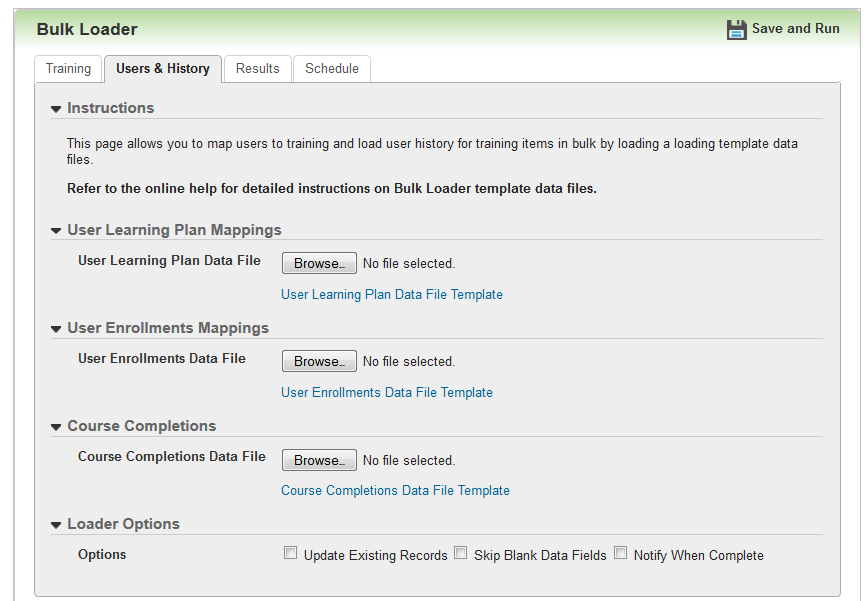
To cater to such requirements of mass transactions, Oracle Learning Cloud (Taleo Learn) introduced the 'Bulk Loader' features few releases back. The bulk loader feature which started off with options to mass create Instructor Lead Trainings (ILTs), has been significantly expanded in the latest release to cover the following functionalities:

a. Create/Update ILT events, tracks, sessions, enrollment
b. Create Learncenter authored courses
c. Map items to categories
d. Manage pre and post-enrollment status of employees
e. Map employees to Learning Plans
f. Manager course completion status of employees

Bulk Loader is available in the Configuration center of Oracle Learning Cloud, allowing L&D administrators to carry out these transactions directly from the web UI. The tool is extremely intuitive as it works like a guided process and provides file templates to be used as well. L&D Administrators should be able to utilise this with minimal or almost no training (which is what cloud solutions are all about).

This feature brings in important considerations from an implementation standpoint as well:

1. Now, partners and customers will be able to carry out migration of training history into Oracle Learning Cloud, without depending on Oracle Consulting. This was earlier restricted only to Oracle Consulting, but bulk loader opens this up for the partner ecosystem, which is great!

2. Post-enrollment status can be updated using bulk loader now. This addresses the need to update 'attendance'/'completion' details of Instructor Lead Trainings. Note that bulk loader can also be scheduled now, bringing in the possibility to automate the updation of post-enrollment statuses in case attendance for a class is tracked externally.

3. A good amount of the initial ILT setup, typically done during the cutover to the product can now be managed through bulk loader.

4. Ensure that the L&D Administrators are fully aware of this feature as this will help to minimise administrative overheads during operations. L&D Admins should love this feature as it involves zero technical overhead!

All in all, this is a great addition to the product which should be utilized by implementation consultants and L&D Administrators alike. 

Friday, August 21, 2015

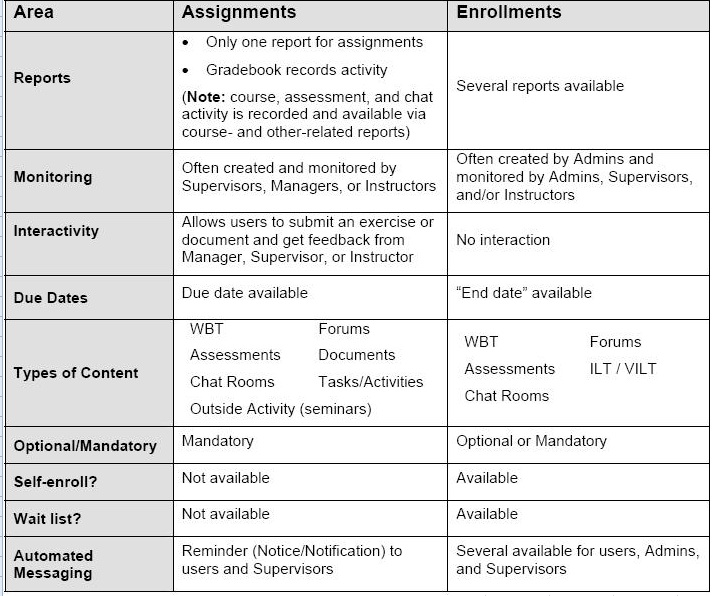
Assignments vs. Enrollments in Taleo Learn

Found this quick reference table in My Oracle Support, that gives an overview of the main differences between Assignments and Enrollments in Taleo Learn. Hope you find it informative!

Saturday, August 1, 2015

Capturing Training Interest in Oracle Learn Cloud


Training Needs Analysis is an integral part of most corporate learning and development strategy. While majority of the training needs are based on the overall organizational strategy and capabilities, it is important to gather individual training needs as well.

In this post we look at utilising the "Training Offerings" feature available in Oracle Learn cloud (formerly Taleo Learn) to enable training departments gauge interest for specific training items. 

Introducing the Training Offerings feature
Let's take the example of a Corporate Information Security compliance training that all employees need to complete within 3 months of joining a company. The company offers an online course as well as class room based training sessions for this. Employees can attend either the classroom training or the online course to complete the Information Security training. This is where Training Offerings come in. Training Offerings allow Learning and Development departments to bundle in multiple training methods into a single collection, giving employees the flexibility to take up the mode of training that suits them best and complete the overall training. 

Utilising Training Offerings to gauge employee training needs analysis
You can create a Training Offering without linking any learning items to it. This empty Training Offering can be opened up to employees to mark their interest in the offering. When a learning item is added to the training offering later on, the employees who showed their interest will be notified of the same. Similarly, the administrator of the Training Offering can view the employees who have shown interest for specific training offerings.

As shown in the image below, employees can indicate their interest for a potential training offering by clicking on the "envelope icon" next to an offering:


The image below shows the Administrator view of Training Offerings, where the administrator can view the employees who have expressed interest for a specific training offering


Post Note:
Driven by technology and workplace organisation changes, corporate learning is undergoing a tectonic transformation. In this new context where employees learn on the go and from sources far beyond the walls of a corporate learning system, where on-demand learning content can be generated - I would question the utility of a traditional training needs analysis itself. 


Oracle Learn Cloud - Adoption of Oracle Business Intelligence

Oracle Learn Cloud (formerly Taleo Learn) introduced Oracle Business Intelligence (BI) based reports from release 15A. BI Reports are in a beta release with existing Insight Reports still available for customers till end of 2015. With the upcoming Oracle Learn Cloud 15B release, Oracle also introduces the capability to define custom BI reports. For more information on Oracle Learn Cloud 15B release, follow this link.

Thursday, July 2, 2015

Fusion HCM R10 Release Highlights

Fusion HCM Release 10 documents are available now on the Release Readiness site. Check it out here for a preview of the upcoming features.
And bookmark the Release Readiness site as it's an extremely useful site.

Monday, June 29, 2015

The Unlearning Times and New Beginnings


After a long hiatus I am back to my blogging desk. The last two years has been a time of new learning and more importantly unlearning for me. The Software as a Service (SaaS) movement turned mainstream over the last two years and it's been an exhilarating experience riding the cloud wave. 
It has been a disruptive period for me; moving from a focus on PeopleSoft HCM to Oracle HCM Cloud suite of products, from projects delivered in years to delivery in weeks, from working on one or two projects at a time to handling multiple projects and more importantly adopting a cloud mindset in delivery. This period of unlearning has left me with little time and quality content to share with you all. I've always believed that it's important for me to write posts that matter, posts that give insights deeper than what the user guides provide. That comes only from experience. Two years into the new product suite and after being part of most of the initial Oracle HCM Cloud wins and implementations in the ASEAN region, I feel it's time for me to start sharing my learning and experience on the journey so far. And to all my PeopleSoft HCM friends - it's important to realise that the shift in HR Technology business and more importantly, the shift in customer preference for HR technology is REAL. Have an open mind and embrace the change!

Friday, April 19, 2013

Workday 19 released - Greater focus on Financials and Mobile

Workday unvelied release 19 few days back. It is mentioned that the new release comes with 170 odd new features. Here are the main improvements that were noted from the press release given out by Workday:

1. Workday 19 comes with the capability to add custom fields and change labels of fields. This has been projected as a major enhancement in release 19. While I totally understand the need for this from customers, it is surprising that it took 19 releases for Workday to bring this out. From my understanding of Oracle Fusion applications, these capabilities are native to Fusion apps. You can read more here on the various 'composers' of Fusion, which can be used to 'configure' the application to change page field labels, page layout etc. globally or for a targeted population.

2. Workday has traditionally had a 'mobile-first' strategy and the user friendliness of their iPad and iPhone apps are legendary. Continuing with that focus, Workday 19 embraces Android with a workday app available for Android.

3. Workday has stated that it's Financials Suite will be a major area of focus in 2013. True to that, Workday 19 has close to 40 new features delivered for Financials. Another focus I have seen is a push to present HR and Financial data together.

Here is a picture gallery of Workday 19 released by Workday. It is interesting to note that Workday is working on a greenfield recruitment module which is expected to release in early 2014.

Thursday, January 10, 2013

Quick notes on Workday's Payroll capabilities

Here are some quick notes from a webcast on Workday Payroll that I attended:

1. Workday Payroll provides country extensions for USA and Canada, at present.
2. For non-US and Canada countries, Workday provides a configurable cloud connector that can be used to integrate with country specific payroll providers.
3. Workday also has local payroll partners like Northgate Arinso, Cloudpay etc. who provide native integration with Workday HCM.
4. The Workday Payroll, HCM and Time Tracking work as an integrated unit rather than being individual silos/modules which are integrated (a plus in comparison to PeopleSoft architecture).
5. The presenter gave a quick demo of Workday Time Tracking (similar to PeopleSoft's Time and Labor) which was released in Workday 17. Except for the advanced mobile time tracking features, I was not floored by what was demonstrated. In terms of the depth of time tracking functionalities, I believe PeopleSoft would be very much up there.
6. The product seemed to be designed around the business process of executing and administering a payroll, rather than around running a payroll engine, which is a real positive. There are a number of audits, alerts, reports and drill down charts that are provided as part of the product and most of these are executed automatically as each phase of the payroll cycle completes.
7. A lot of calculations, especially around time rules and absence balances seemed to be real time, rather than depending on a process to be run. It was pretty interesting to see the calculated payable time being displayed immediately on saving the timesheet! I should mention here that generation of payable time on submitting the timesheet is a feature that has been announced in PeopleSoft v9.2.
8. The presenter mentioned that the largest Workday Payroll customer has a headcount of 40,000 employees and that half of Workday's 400+ customers use Workday Payroll.

I do not want to delve into comparing the Workday solution with that of PeopleSoft - a one hour session is too short to make any meaningful conclusion. But, it seemed to me that usability, analytics, ease of payroll processing and a business process oriented approach are obvious plus points of Workday payroll (this is to be expected given the generational difference in technology used in the two products!). Given the tools provided and the process oriented design of the module, payroll processing should be faster and less error prone in Workday payroll in comparison to PeopleSoft. But, for Time and Attendance and Payroll processes, depth of functionality and configurability matter more than great usability. It is also obvious that payroll is not the focus area for Workday as they offer country extensions for just USA and Canada (already Oracle Fusion provides payroll extensions for more countries, including China, UK and Saudi Arabia) and have a partnership model as their global payroll strategy.
Considering the relative lack of focus of Workday Payroll outside USA/Canada, risks and effort involved in a typical payroll migration project and the proven capabilities of PeopleSoft Global Payroll, makes Workday payroll less of a direct threat to the installed base of PeopleSoft Global Payroll in the short term. Here is where I think that the co-existence model offered by Oracle Fusion is better suited to help PeopleSoft Global Payroll customers transition to a SaaS based solution (Fusion) for core HCM and Talent Management while utilising the HR2HR integration to retain PeopleSoft Global Payroll. This option gives customers the time to phase out their HR and Payroll system transformation roadmap with lesser disruptions.

Update on 17/01/2013: There is an interesting discussion in the Workday HCM group in LinkedIn on Workday payroll and comments from customers who are already live on the product.
You can follow it here.

And here are some screenshots depicting Workday's Global Payroll model and partners:


Payroll partners of Workday with integration to Workday HCM/Time Tracking:

Monday, March 26, 2012

Design Flaw in PeopleSoft Work Schedule Defaults and design in Oracle Fusion HCM

For a Human Resources ERP suite, PeopleSoft HCM has excellent Time and Attendance features. One area that is highly under-appreciated (but lauded by customers when they see the complete potential!) is the Schedule Management features in PeopleSoft Time and Labor and Absence Management. Some of the features, like the ability to define flexible work schedules, ability to create work schedules on the fly, integrated Time Calendar views with Time, Absence and Training information etc. are very exciting and useful. In this post, I want to highlight a glaring flaw in the design of the work schedule defaulting feature in PeopleSoft. A Work Schedule can be attached at multiple levels in PeopleSoft HCM, for eg:
a. At the employee level in the Assign Work Schedule page (underlying datastructure is SCH_ASSIGN)
b. At the Absence Management/Global Payroll Paygroup level
c. At the Payroll for North America Paygroup level
d. At the Time and Labor workgroup level

If a work schedule is not directly attached to an employee, PeopleSoft follows a specific hierarchy to resolve the work schedule that has to be assigned. In this hierarchy, Absence Management/Global Payroll paygroup takes precedence over Payroll for North America paygroup, which takes precedence over Time and Labor workgroup.
In our opinion, it is not a good practice to default a work schedule from a Paygroup or Workgroup. The primary purpose of a Paygroup/Workgroup is to group employees with similar pay/absence/time characteristics together and is not to group employees working similar schedules. The fact that Absence Management/Global Payroll paygroups take precedence over other definitions makes the case more rigid in our opinion. This is because, the Global Payroll/Absence Management organisational and processing frameworks are extremely flexible. It is possible to define very generic paygroups and then drive application of specific rules to concerned group of employees through the use of conditional processing elements or even payee level overrides. An optimal design of Absence Management/Global Payroll frameworks should make use of this inherent product flexibility and design simple,lean and flat frameworks. The simpler the configuration, the more generic will be the assignment of paygroups, i.e. most employees will share the same paygroup. But, most often it is required to have more specific groupings for the purpose of work schedule defaults. So a simplistic Absence Management/Global Payroll framework design will not help in proper defaulting of work schedules. We have seen many legacy Time and Attendance applications (applications from which the client moved to PeopleSoft Time and Attendance) where the time processing rules were tightly tied to the work schedule of employees. This is our mind is similar to the concept of tying a work schedule to a paygroup/workgroup. But, all these systems suffered from the complexity introduced by the tight coupling of rule processing groups and schedules and the same deficiency exists in PeopleSoft as well.
My suggestion to the PeopleSoft Time and Labor/Absence Management product managers would be to take a relook at the schedule default options in PeopleSoft and provide a mechanism to default work schedules from a data definition that is more attuned with the actual business process of wok schedule assignments. In our opinion, Jobcodes and especially Positions are excellent candidates for this. From an operational point of view, employees in a certain jobcode or position have more probability of sharing a work schedule that those in the same paygroup (ofcourse the challenge of global implementations and shared jobcodes/positions do come in here, but we believe that these definitions are better candidates for work schedule defaults than a paygroup).

In this context, we want to introduce the work schedule defaulting features available in Oracle Fusion HCM. In Fusion HCM, the hierarchy of work schedule resolution is given below:
  1. Primary assignment of the worker
  2. Position
  3. Job
  4. Department
  5. Location
  6. Legal Employer
  7. Enterprise
It's excellent to see that Oracle Fusion HCM offers a more flexible and elaborate work schedule assignment mechanism, which in our opinion is more in tune with the business requirements. We do hope that the PeopleSoft design team takes a cue from the Oracle Fusion HCM design and provides a more flexible work schedule defaulting design.