Steve McConnell's classic mistakes in Software Project Management defines Developer Goldplating as following:
"Developers are fascinated by new technology and are sometimes anxious to try out new features of their language or environment or to create their own implementation of a slick feature they saw in another product--whether or not it's required in their product. The effort required to design, implement, test, document, and support features that are not required lengthens the schedule."
I find the entire concept of developer goldplating and it's classification as a 'classic mistake' extremely amusing. This is because the unfounded fear of goldplating restricts the creativity and realms of a developer and nips the chances of delving out outstanding customer service. Almost all the projects that I have worked on has had the customer coming back with his/her own 'wishlist' at the very last moment and traditional software engineering theory would say that it has to be treated as requirement creep and will have to be carried out as separate change requests in the future. Well that might sound judicious from the point of view of project management, but not from the view of customer experience management. Any project dedicated to providing a great customer experience should try to address even the last minute requests from the client - this is no goldplating and it will be something the customer will rave about. I know that may be nine out of ten people will not agree on this - but for someone who values a happy customer above anything else, requirement creep management can never come in the way of customer satisfaction!!
Monday, July 27, 2009


Auto-Displaying Search page results
What do you do if the customer comes up to you and says that they find clicking the 'Search' button on the search page cumbersome and would 'love' to have the search results defaulted when the search page loads.
This is where the SetSearchDialogBehaviour function will come to your rescue. Assign wildcard values to your search fields and call the SetSearchDialog behaviour function. This function is normally used in the context of skipping the search page. Theoretically, if a complete value is provided for all search keys before calling the SetSearchDialog behaviour function, then the search page will be skipped and the users will be taken directly into the transaction page. But the actual idea behind the function is that it will auto-trigger the search functionality. So naturally when just a wild card value is given to the search fields and the function invoked, then all the search results will be displayed. For example, if EMPLID is the only search field, the following code can be written to popualte the search results automatically on loading the search page.
/*Write this code in SearchInit.*/
REC.EMPLID.value = '%';
SetSearchDialogBehaviour(0);
This is where the SetSearchDialogBehaviour function will come to your rescue. Assign wildcard values to your search fields and call the SetSearchDialog behaviour function. This function is normally used in the context of skipping the search page. Theoretically, if a complete value is provided for all search keys before calling the SetSearchDialog behaviour function, then the search page will be skipped and the users will be taken directly into the transaction page. But the actual idea behind the function is that it will auto-trigger the search functionality. So naturally when just a wild card value is given to the search fields and the function invoked, then all the search results will be displayed. For example, if EMPLID is the only search field, the following code can be written to popualte the search results automatically on loading the search page.
/*Write this code in SearchInit.*/
REC.EMPLID.value = '%';
SetSearchDialogBehaviour(0);
Thursday, July 16, 2009
Oracle MINUS function works bottom to top
Remember that the MINUS function in Oracle works bottom to top and the order in which statements are written will change the result set! So select x from a minus select y from b is not the same as select y from b minus select x from a....The bottom part of the query is executed first and a MINUS function will always give those rows present in the bottom part of the query and not in the top half.
Sunday, July 5, 2009
Follow this blog on Twitter!
Twitter has not gained the popularity of a Facebook or LinkedIn in this part of the world - and the first time I took notice of the new kid on the social networking space was when the U.S. State department endorsed the importance of Twitter as a medium of communication for Iranians during the recent turmoil following the presidential elections there. That made me sit up andtake notice, boy if the U.S. State department had to make an appeal to a privately held dot com newbie, then it's got to be a phenomenon.
So the story goes that this blog is now on Twitter and you can follow me and all the updates to this blog at http://twitter.com/peoplesofthrms.
As a sidenote, I believe that it's time enterprise applications embrace Web 2.o applications like Twitter, Facebook and LinkedIn. Oracle is introducing a lot of Web 2.0 technologies like Ajax in the next Peopletools release (8.50), but they need to have a rethink in terms of adopting some of these social networking applications in the core product functionality. I believe that with the widespread adoption and following of these applications, the line between social portals and enterprise portals is slowly fading away - one immediate thought that comes to me is the use of tweets as a supplementary to alerts in Peoplesoft - wouldn't it be 'cool' to get tweets from Peoplesoft when your manager approves your absence request or when he completes your performance document review?
So the story goes that this blog is now on Twitter and you can follow me and all the updates to this blog at http://twitter.com/peoplesofthrms.
As a sidenote, I believe that it's time enterprise applications embrace Web 2.o applications like Twitter, Facebook and LinkedIn. Oracle is introducing a lot of Web 2.0 technologies like Ajax in the next Peopletools release (8.50), but they need to have a rethink in terms of adopting some of these social networking applications in the core product functionality. I believe that with the widespread adoption and following of these applications, the line between social portals and enterprise portals is slowly fading away - one immediate thought that comes to me is the use of tweets as a supplementary to alerts in Peoplesoft - wouldn't it be 'cool' to get tweets from Peoplesoft when your manager approves your absence request or when he completes your performance document review?
Saturday, July 4, 2009
Best Peoplesoft Time and Labor blog?
This might sound vane, but according to the Google Search engines you are now reading the best blog on Peoplesoft Time and Labor!
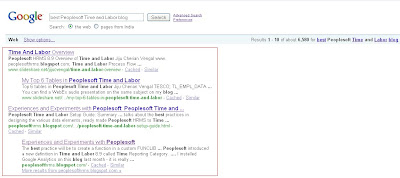
While I know that's an insignificant indicator to be proud about, but I hope that my posts have been helpful to consultants seeking information on Peoplesoft HRMS and Time and Labor in particular. I started this blog in 2008 primarily to try my part in filling the lack of quality reference materials available for Peoplesoft functional modules and after being appalled at the prohibitive cost of the training courses available for the product. Do let me know your comments and suggestions to improve the content of this blog and keep those visits coming!!

While I know that's an insignificant indicator to be proud about, but I hope that my posts have been helpful to consultants seeking information on Peoplesoft HRMS and Time and Labor in particular. I started this blog in 2008 primarily to try my part in filling the lack of quality reference materials available for Peoplesoft functional modules and after being appalled at the prohibitive cost of the training courses available for the product. Do let me know your comments and suggestions to improve the content of this blog and keep those visits coming!!
Search Page security in Peoplesoft Time and Labor
I had detailed how Time and Labor security works in a previous post and today I want to touch upon how customers can configure the security on the Manager Self Service and Administrators for Time and Labor. Currently, there are three distinct ways of configuring search page security in Peoplesoft (including Time and Labor):
1. Use the highly robust and modified Core Row Level security, where any level of flexible security definition can be created with the introduction of Security Access Types in Peoplesoft HRMS 8.9.
2. Use the Direct Reports functionality which most of the MSS pages of Absence Management and e-Performance make use of. This feature will provide a standard page containing the direct reports of a user.
3. Use Time and Labor security to show to users employees in the Static and Dynamic groups that they have access to.
(You can also enforce search security through Search Init peoplecode, but this approach is highly discouraged.)
Most organisations will be designing their search security by making use of the new Row Level security design and in this context, a debatable question is whether we need to use Time and Labor security itself? Also, a number of people ask whether we can use Row Level security for the Time and Labor search pages, or whether it can make use of only Time and Labor security.
The answer is provided by the below decision chart (click on the picture to see a larger view):
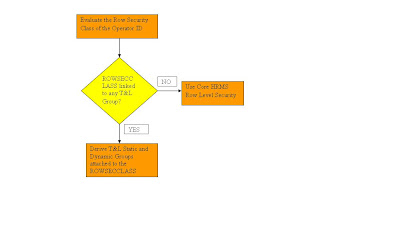 All the Search pages in Time and Labor is flexible enough to utilize both Time and Labor security and core Row Level security. This decision depends on how the rowsecclass attached to a user is configured. If the rowsecclass is attached to any Time and Labor group (this can be found from the table PS_TL_GRP_SECURITY), then the user will be able to see only employees belonging to the groups the user's rowsecclass has access to. On the other hand, if there are no Time and Labor groups attached to the rowsecclass of the user, then core row level security available for the user will be used to fetch the employees.
What should be the optimum Time and Labor search security strategy?
If your organisation is using other Peoplesoft HRMS modules then it is best to utilise a common security design for all the modules. So I will always suggest using row level security for Time and Labor pages and not to configure any extra Time and Labor groups for the purpose of row level security.
Time and Labor groups can be created for the purpose of batch processing of employees. It is very useful to create Time and Labor groups and use the group as an input parameter for the Time Administration or Batch Approval or Batch Schedule Assignment processes. Note that a Time and Labor group can be defined without linking it to any row security class and used solely for the purpose of grouping employees together.
1. Use the highly robust and modified Core Row Level security, where any level of flexible security definition can be created with the introduction of Security Access Types in Peoplesoft HRMS 8.9.
2. Use the Direct Reports functionality which most of the MSS pages of Absence Management and e-Performance make use of. This feature will provide a standard page containing the direct reports of a user.
3. Use Time and Labor security to show to users employees in the Static and Dynamic groups that they have access to.
(You can also enforce search security through Search Init peoplecode, but this approach is highly discouraged.)
Most organisations will be designing their search security by making use of the new Row Level security design and in this context, a debatable question is whether we need to use Time and Labor security itself? Also, a number of people ask whether we can use Row Level security for the Time and Labor search pages, or whether it can make use of only Time and Labor security.
The answer is provided by the below decision chart (click on the picture to see a larger view):
 All the Search pages in Time and Labor is flexible enough to utilize both Time and Labor security and core Row Level security. This decision depends on how the rowsecclass attached to a user is configured. If the rowsecclass is attached to any Time and Labor group (this can be found from the table PS_TL_GRP_SECURITY), then the user will be able to see only employees belonging to the groups the user's rowsecclass has access to. On the other hand, if there are no Time and Labor groups attached to the rowsecclass of the user, then core row level security available for the user will be used to fetch the employees.
What should be the optimum Time and Labor search security strategy?
If your organisation is using other Peoplesoft HRMS modules then it is best to utilise a common security design for all the modules. So I will always suggest using row level security for Time and Labor pages and not to configure any extra Time and Labor groups for the purpose of row level security.
Time and Labor groups can be created for the purpose of batch processing of employees. It is very useful to create Time and Labor groups and use the group as an input parameter for the Time Administration or Batch Approval or Batch Schedule Assignment processes. Note that a Time and Labor group can be defined without linking it to any row security class and used solely for the purpose of grouping employees together.
Thursday, June 25, 2009
Heard of the TL_XREF_TBL??
True to the Pareto Principle, 80% or more of the work in any Peoplesoft module can be done by knowing just 20% (or far lesser) of the tables in the system. But it's real exciting to explore and look at the rest of the infrequently used tables as most of them will have a very specific purpose which might come to light only under certain rare occassions. One such table is TL_XREF_TBL.
Where is it used?
The XREF table plays a critical part in the integration of Time and Labor and North American Payroll. When Payable Time is loaded from the TL_PAYABLE_TIME table to the paysheets in North American Payroll, the load program consolidates payable time entries before sending to NA Payroll. Consolidation means that the quantity for each TRC is summed up and a single entry with the aggregate quantity is sent to NA Payroll for each TRC under the period in question. During this process, the system assigns a cross reference number (XREF_NUM) to all the consolidated entries of a single TRC. The TL_XREF_TBL stores the XREF_NUM corresponding to each sequence number on the payable time table. The NA Payroll table PS_PAY_OTH_EARNS also contains a filed called XREF_NUM which can be used to find out the pay line entries corresponding to the spefic data that came from time and labor.
What is the practical utility of the table?
For most parts the XREF table is a background table which a developer may never need to use. But it will be very useful to audit the data flow between Time and Labor and N A Payroll. I have used this in scenarios where customers have reported issues with payable time data not coming over to payroll. In this case, the link between payable time entries and paysheet entries can be drawn to the minutest detail using the XREF_NUM.
Where is it used?
The XREF table plays a critical part in the integration of Time and Labor and North American Payroll. When Payable Time is loaded from the TL_PAYABLE_TIME table to the paysheets in North American Payroll, the load program consolidates payable time entries before sending to NA Payroll. Consolidation means that the quantity for each TRC is summed up and a single entry with the aggregate quantity is sent to NA Payroll for each TRC under the period in question. During this process, the system assigns a cross reference number (XREF_NUM) to all the consolidated entries of a single TRC. The TL_XREF_TBL stores the XREF_NUM corresponding to each sequence number on the payable time table. The NA Payroll table PS_PAY_OTH_EARNS also contains a filed called XREF_NUM which can be used to find out the pay line entries corresponding to the spefic data that came from time and labor.
What is the practical utility of the table?
For most parts the XREF table is a background table which a developer may never need to use. But it will be very useful to audit the data flow between Time and Labor and N A Payroll. I have used this in scenarios where customers have reported issues with payable time data not coming over to payroll. In this case, the link between payable time entries and paysheet entries can be drawn to the minutest detail using the XREF_NUM.
Automatic Schedule assignment during hire
Schedule Assignment to an employee can be done at multiple levels in Peoplesoft. With the continuous improvement in scheduling that Peoplesoft/Oracle has brought into the product, they introduced a feature to directly assign schedules to employees. This feature is available under the Manage Schedule folder in MSS. A lot of clients require the process of schedule assignment to an employee to be automated at the time of hire and I have seen specific application engines being written for this purpose. That is an unnecessary effort as Peoplesoft already provides that feature with the WORKFORCE_SYNC message. The WORKFORCE_SYNC message will assign a row in the PS_SCH_ASSIGN table with the Use Default Schedule option ticked as Yes. The message itself is triggered on the Save Post Change event in the JOB DATA components. For tools versions higher than 8.47, it will be required to write specific handler logic for this to happen. This is because the assignment was handled by subscription peoplecode in versions lesser than 8.48 and this has become defunct with the architectural changes to the IB framework in 8.48. The steps to do that is:
1. Obtain the code of the schedule assignment from the subscription peoplecode assigned to the WORKFORCE_SYNC message.
2. Create a new Application Package and extent the OnNotify method of the PS_PT App Package.
3. Call the code for the assignment in the OnNotify method. The best practice will be to create a function in a custom FUNCLIB record containing the logic for the schedule assignment and calling just the function from the OnNotify method.
4. Add a new handler to the WORKFORCE_SYNC Service Operation with an OnNotify event defintion and give the application package and method details.
5. Ensure that the service operation is active and that the queue is running. Also generate Local routing if that has not yet been done.
6. You are good to go now!
1. Obtain the code of the schedule assignment from the subscription peoplecode assigned to the WORKFORCE_SYNC message.
2. Create a new Application Package and extent the OnNotify method of the PS_PT App Package.
3. Call the code for the assignment in the OnNotify method. The best practice will be to create a function in a custom FUNCLIB record containing the logic for the schedule assignment and calling just the function from the OnNotify method.
4. Add a new handler to the WORKFORCE_SYNC Service Operation with an OnNotify event defintion and give the application package and method details.
5. Ensure that the service operation is active and that the queue is running. Also generate Local routing if that has not yet been done.
6. You are good to go now!
Friday, April 24, 2009
What is the purpose of a TRC Category in Time and Labor?
Peoplesoft introduced a new definition in Time and Labor 8.9 called Time Reporting Category. A new field was introduced in the TRC Setup page, where a TRC could be mapped to a category. A TRC Category can be used to group functionally similar TRCs together. For example, if your organisation uses three different over time TRCs like OT1, OT2 and OT3 for different rates of overtime - you could create a TRC Category called Over Time and link the above three TRCs to this.
But where exactly is this new definition used?
The primary purpose of this new definition is to populate the newly introduced grid called 'Reported Hours Summary' in the Timesheet page. This grid gives the summary based on the TRC Category reported in the timesheet. This is specifically useful as a single snapshot view of the summary of various categories of time reported in a period. For example, suppose there are three TRC Categories like Regular, Overtime and Absence. In a week an employee has reported 4 hours of Regular time on three days, 2 hours of OT1 TRC on one day, 2 hours of OT2 TRC on one day, 8 hours of Sick Leave on one day and 3 hours of Bereavement Leave on one day. When this is summarised based on the TRC Categories - the viewer very clearly gets the picture that the employee reported a total of 12 hours of Regular Time, 4 hours of Over Time and 11 hours of Absence in the week.
Another potential use of the TRC Category definition is in reports to group TRCs together. Reports based on the TRCs reported, like overtime reports are very common in any implementation. In this case, it will be useful to create a single TRC Category called Over Time and link all the Over Time TRCs to that category and later use the category in the report rather than hard coding the TRC names.
You will also notice that this new definition has a mention in the Time and Labor installation page also, where we can control whether it should appear in the timesheet page. Even though its a very small functionality enhancement, I will advice any implementation that has more than 10 TRCs, to consider the use of well segmented, logical TRC Categories.
But where exactly is this new definition used?
The primary purpose of this new definition is to populate the newly introduced grid called 'Reported Hours Summary' in the Timesheet page. This grid gives the summary based on the TRC Category reported in the timesheet. This is specifically useful as a single snapshot view of the summary of various categories of time reported in a period. For example, suppose there are three TRC Categories like Regular, Overtime and Absence. In a week an employee has reported 4 hours of Regular time on three days, 2 hours of OT1 TRC on one day, 2 hours of OT2 TRC on one day, 8 hours of Sick Leave on one day and 3 hours of Bereavement Leave on one day. When this is summarised based on the TRC Categories - the viewer very clearly gets the picture that the employee reported a total of 12 hours of Regular Time, 4 hours of Over Time and 11 hours of Absence in the week.
Another potential use of the TRC Category definition is in reports to group TRCs together. Reports based on the TRCs reported, like overtime reports are very common in any implementation. In this case, it will be useful to create a single TRC Category called Over Time and link all the Over Time TRCs to that category and later use the category in the report rather than hard coding the TRC names.
You will also notice that this new definition has a mention in the Time and Labor installation page also, where we can control whether it should appear in the timesheet page. Even though its a very small functionality enhancement, I will advice any implementation that has more than 10 TRCs, to consider the use of well segmented, logical TRC Categories.
Wednesday, April 22, 2009
Peoplesoft Time and Labor: My wishlist - I
I believe that Peoplesoft has done an awesome job with the Time and Labor product - it's flexibility, features and strong integration capabilities make it a very strong product that caters very well to most business needs. Yet, there are some areas I wish Oracle could improve upon, some features that I sorely miss and so here is my wish list for a future release of Time and Labor.
> Integration with HRMS: It is critical that Time and Labor data is kept in sync with the HRMS data. Most implementations require the development of a process to do this, considering the inevitability of this process, it will be a relief for customers to have this as a delivered process.
> Restore Feature on Timesheet: There should be a feature to restore the timesheet to the last saved state. This will be a usability improvement and a much asked one by many customers I've worked with.
> Online Rules as Validation Messages: There is a delivered feature that allows the users to execute Time and Labor rules on the timesheet, but unfortunately this process just generates exceptions. It would be more meaningful and helpful if these online rules could be thrown up as a validation/error message. Most implementations require varying degree of online validations during time entry - it would be great to have those configured as T&L rules rather than through Peoplecode as T&L rules can be configured from the PIA and will not have to disturb any delivered component.
> Performance Improvement: Performance is a real issue with Time and Labor. Oracle needs to take a good look at both online performance (some of the delivered pagelets perform so poorly that they cannot be used at all!) as well as that of batch jobs like Time Administration.
> Mass Upload time through spreadsheet: It would be a nice to have feature to have a page from where users can directly upload reported time from a spreadsheet. Even though Time and Labor comes with the Rapid Time feature, there is nothing like working directly with an excel worksheet!
> More Delivered Reports: Customers would love to have more delivered reports with the product. Reports on employee schedules, reported time-payable time reconciliation, absence data-reported time reconciliation etc. would be a run away hit amongst the customers.
> T&L Rule Migration Engine: Modelled in a way similar to the Rule Packager utility in Absence Management, Time and Labor should also have a simple engine to aid in the migration of T&L Rules from one environment to another.
> Manager Dashboard: As Time and Labor data talks a lot about employee productivity and discipline, it would be wonderful to have a Manager Dashboard pagelet with analysis on Employee attendance information, Employee punctuality, Overtime and Productivity, Absenteeism etc.
> Delivered Localised Rules: Similar to the country extensions of GP that cater to the local country taxation and payroll rules, it would be a wonderful idea for Oracle to deliver Time and Labor with local rules of countries/cities. Some countries and cities have mandatory time and labor rules which every organisation will have to follow and there is nothing like getting that delivered with the product. The development, testing and maintenance time that this will save is immense for customers to readily lap up this feature.
If Oracle is reading, I am sure that some of these changes will go a long way in making Time and Labor a stronger product and the developer and user community would love to see some of these propping in to future releases.
> Restore Feature on Timesheet: There should be a feature to restore the timesheet to the last saved state. This will be a usability improvement and a much asked one by many customers I've worked with.
> Online Rules as Validation Messages: There is a delivered feature that allows the users to execute Time and Labor rules on the timesheet, but unfortunately this process just generates exceptions. It would be more meaningful and helpful if these online rules could be thrown up as a validation/error message. Most implementations require varying degree of online validations during time entry - it would be great to have those configured as T&L rules rather than through Peoplecode as T&L rules can be configured from the PIA and will not have to disturb any delivered component.
> Performance Improvement: Performance is a real issue with Time and Labor. Oracle needs to take a good look at both online performance (some of the delivered pagelets perform so poorly that they cannot be used at all!) as well as that of batch jobs like Time Administration.
> Mass Upload time through spreadsheet: It would be a nice to have feature to have a page from where users can directly upload reported time from a spreadsheet. Even though Time and Labor comes with the Rapid Time feature, there is nothing like working directly with an excel worksheet!
> More Delivered Reports: Customers would love to have more delivered reports with the product. Reports on employee schedules, reported time-payable time reconciliation, absence data-reported time reconciliation etc. would be a run away hit amongst the customers.
> T&L Rule Migration Engine: Modelled in a way similar to the Rule Packager utility in Absence Management, Time and Labor should also have a simple engine to aid in the migration of T&L Rules from one environment to another.
> Manager Dashboard: As Time and Labor data talks a lot about employee productivity and discipline, it would be wonderful to have a Manager Dashboard pagelet with analysis on Employee attendance information, Employee punctuality, Overtime and Productivity, Absenteeism etc.
> Delivered Localised Rules: Similar to the country extensions of GP that cater to the local country taxation and payroll rules, it would be a wonderful idea for Oracle to deliver Time and Labor with local rules of countries/cities. Some countries and cities have mandatory time and labor rules which every organisation will have to follow and there is nothing like getting that delivered with the product. The development, testing and maintenance time that this will save is immense for customers to readily lap up this feature.
If Oracle is reading, I am sure that some of these changes will go a long way in making Time and Labor a stronger product and the developer and user community would love to see some of these propping in to future releases.
Direct Reports UI and Peoplecode Transfer Function
The Transfer function is used in Peoplecode to move the users to a desired page within the same component or another component. A syntax for the function is as shown below(source Peoplebooks 8.48 - Peoplecode Language Reference) :
Transfer(true, MENUNAME.ADMINISTER_PERSONNEL, BARNAME.USE, ITEMNAME. PERSONAL_DATA, PAGE.PERSONAL_DATA_1, "U");
As shown above, the Menuname, Barname, Itemname and Page name of the target page has to be passed in this function. Rather than hard coding these values in the code, it will be a good practice if the above parameters are derived from a PIA page. Take a look at the page where we set up the Direct Reports Utility (Setup HRMS --> Common Definitions --> Direct Reports for Managers --> Direct Reports Setup).
 The delivered Direct Reports Utility is designed to show the same employee selection page to the manager in various components and then is designed to redirect the manager to the appropriate page using the Transfer function. This functionality can be adopted for any custom requirement also. The parameters for the transfer function can be configured on this page and later retrieved Peoplecode by passing the component and market details (Use %Component and %Market as best practis). The only disadvantage I see is that if there are multiple transfer functions being used in the same custom component, then this is not a feasible solution. The elegance of the solution lies in the fact that nothing will have to be hardcoded in the transfer function code and is a completely maintainable and scalable solution.
Transfer(true, MENUNAME.ADMINISTER_PERSONNEL, BARNAME.USE, ITEMNAME. PERSONAL_DATA, PAGE.PERSONAL_DATA_1, "U");
As shown above, the Menuname, Barname, Itemname and Page name of the target page has to be passed in this function. Rather than hard coding these values in the code, it will be a good practice if the above parameters are derived from a PIA page. Take a look at the page where we set up the Direct Reports Utility (Setup HRMS --> Common Definitions --> Direct Reports for Managers --> Direct Reports Setup).
 The delivered Direct Reports Utility is designed to show the same employee selection page to the manager in various components and then is designed to redirect the manager to the appropriate page using the Transfer function. This functionality can be adopted for any custom requirement also. The parameters for the transfer function can be configured on this page and later retrieved Peoplecode by passing the component and market details (Use %Component and %Market as best practis). The only disadvantage I see is that if there are multiple transfer functions being used in the same custom component, then this is not a feasible solution. The elegance of the solution lies in the fact that nothing will have to be hardcoded in the transfer function code and is a completely maintainable and scalable solution.
Sunday, April 19, 2009
Which city has the maximum Peoplesoft projects?
I installed Google Analytics on this blog last month - it is really fascinating to see the amount of data the tool provides free of cost. The metrics provided include - number of visits per day, source of visitors, key words used to search for the site, language, browser, time spent by a user on the site, navigation pattern etc. Out of all the metrics, one that really interests me is one called 'map overlay' - this gives the geographical location of the visitors. Now, I've been thinking whether I could look at the data on the map overlay metrics to arrive at the places around the globe where maximum Peoplesoft activity (read projects) happens. Here is how the metrics look as of today -
 The number of visits are directly proportional to the darkness of the green on the map. So undoubtedly the USA is the place to be as far as Peoplesoft is concerned - within the US, California sent in maximum visitors followed by New York. India, Canada and the UK follow suite. There was considerable activity from South American countries like Brazil, Chile and Columbia as well as from Asian countries like Vietnam, Philippines and Singapore. These countries represent a viable alternative to traditional outsourcing centres like India and the South American activity is especially significant in this regard. The geographical proximity to the US and the growing Hispanic population in US should make South American countries an attractive 'near-shoring' alternative. It will be really interesting if other Peoplesoft bloggers and especially the ivy league PS bloggers like Grey Sparling and Jim Marion could share the visitor profiles on their site as it would give a more realistic view of Peoplesoft activity from across the globe. But in the mean time, keep those clicks coming!
 The number of visits are directly proportional to the darkness of the green on the map. So undoubtedly the USA is the place to be as far as Peoplesoft is concerned - within the US, California sent in maximum visitors followed by New York. India, Canada and the UK follow suite. There was considerable activity from South American countries like Brazil, Chile and Columbia as well as from Asian countries like Vietnam, Philippines and Singapore. These countries represent a viable alternative to traditional outsourcing centres like India and the South American activity is especially significant in this regard. The geographical proximity to the US and the growing Hispanic population in US should make South American countries an attractive 'near-shoring' alternative. It will be really interesting if other Peoplesoft bloggers and especially the ivy league PS bloggers like Grey Sparling and Jim Marion could share the visitor profiles on their site as it would give a more realistic view of Peoplesoft activity from across the globe. But in the mean time, keep those clicks coming!
Subscribe to:
Posts (Atom)