Time lost is lost forever - true and I've had three full months without any new posts....Personally it's been an exciting period for me - moving out of the lax groove of bachelorhood, being married to the woman I love and finding that the 'life' in 'work-life balance' indeed does exist!
Eventhough it's three months into the new year, let me wish all of you a wonderful year ahead - a year full of new and fruitful experiences and learning!
I am sure that 2010 is going to be more exciting than the last two years which saw companies freezing investment on HR projects eclipsed by the worst recession since 1930s. Things have already started to look up - companies are hiring Peoplesoft consultants in scores and dozens, organisations have lapped up version 9.1 in a big way and HRIT projects seem to be getting favour once again!
So, what is going to be my theme and focus in the year ahead? Undoubtedly it's got to be about finding better ways to give customers a better deal in Peoplesoft Time and Pay implementations. I believe it's time for us to offer specialised and holistic solutions in this space to our customers and look beyond words like 'deployment' or 'implementation'. Undoubtedly, any time and pay HR suite (includes Time and Labor, Absence Management and Payroll solutions) has a direct impact on the company's financials and it's extremely critical to get it right the first time. I am convinced that we have a long way to go in this space - simply implementing certain modules will not work in this case as any time and pay implementation requires extensive integration between the modules as well as with external systems, requires tight audits and most importantly, the real life scenarios are extremely difficult to simulate in a test environment. I will not be exaggerating when I say that there are a number of customers out there who are bleeding thousands of dollars every pay period due to the issues with their time and pay systems - don't they require a better deal? I am convinced that they do and it will be difficult to achieve that with the current approach to Peoplesoft implementation.
My focus over the next few months will be on conceptualising a better framework and approach to time and pay system adoption and this blog will be my mouthpiece!
Thursday, April 1, 2010


Tuesday, December 1, 2009
Peopletools 8.50 supports UK English!
UK English has been added as a new language option available in Peopletools 8.50! I am sure that my folks in UK will be happy to hear that!!
Cheers to that!
Cheers to that!
Sunday, November 22, 2009
Peoplesoft HRMS 9.1: Changes to Time Approval setup and Functional Implications
I had discussed in my previous posts about the introduction of Approval Workflow Engine for Time and Labor in version 9.1. This post discusses the functional implications, changes and challenges this change poses in comparison to the Approval Process prevalent in previous versions.
A note on Time Approval in Time and Labor: Time can be approved at two levels - Reported Time or/and Payable Time. Whether reported time/payable time requires approval can be setup at the Workgroup as well as TRC level. If a TRC is set to have Reported Time approval, then the Time Administration process will not pick up time reported under that TRC unless it is approved. Similarly if a TRC is setup to have Payable Time approval, then a payable time row under that TRC will not be sent to any payroll system unless the payable time is approved.
How Approval Used to happen prior to 9.1: The approve reported time/payable time component in versions 8.9/9.0 was designed to retrieve all rows requiring approval for employees a user's security had access to. The logic used to derive the employees a user can see in a T&L MSS page is explained in this post. This meant that the user could approve the time of all users that he/she had access to as per the security settings.
What has changed in version 9.1: In 9.1, time approval is driven by the approval workflow engine (AWE). Oracle has delivered a number of approval definition ids - for example - approval by position management, supervisor id, department manager, position department manager, position supervisor, T&L approval group etc. Also, the approver in an AWE definition is determined by the 'User List' attached to the defintion id as shown below:
A note on Time Approval in Time and Labor: Time can be approved at two levels - Reported Time or/and Payable Time. Whether reported time/payable time requires approval can be setup at the Workgroup as well as TRC level. If a TRC is set to have Reported Time approval, then the Time Administration process will not pick up time reported under that TRC unless it is approved. Similarly if a TRC is setup to have Payable Time approval, then a payable time row under that TRC will not be sent to any payroll system unless the payable time is approved.
How Approval Used to happen prior to 9.1: The approve reported time/payable time component in versions 8.9/9.0 was designed to retrieve all rows requiring approval for employees a user's security had access to. The logic used to derive the employees a user can see in a T&L MSS page is explained in this post. This meant that the user could approve the time of all users that he/she had access to as per the security settings.
What has changed in version 9.1: In 9.1, time approval is driven by the approval workflow engine (AWE). Oracle has delivered a number of approval definition ids - for example - approval by position management, supervisor id, department manager, position department manager, position supervisor, T&L approval group etc. Also, the approver in an AWE definition is determined by the 'User List' attached to the defintion id as shown below:
 A 'User List' can be a SQL/Application Package code/Query or a Role that determines the operatorids to which the request should be routed for approval. Thus, the approvers of a certain request are determined by the user list attached to the AWE definition id. This means that HRMS security/T&L security no longer plays a role in determining the approver - and more importantly the fact that a certain user has security to view a particular employee in Time and Labor does not guarantee the fact that he/she will be able to view the time requiring approval of those employees.
What is the functional implication of this change:
> The biggest functional implication of this change will be the way Time and Labor administrators approve time. In previous versions, administrators could approve time of all employees they had access to by their core row level security or time and labor security. This will no more be the case in version 9.1 - even if the administrators will be able to view the employees' timesheets, they will no longer be able to approve reported/payable time by default. The user list logic of the AWE process definition will have to be customized to return administrators also as legitimate approvers if they have to have access to approve reported/payable time. In effect I would say that from version 9.1 - search security and approval security have been differentiated in Time and Labor with row level security controlling search and AWE user list controlling approval security.
> There is an option to 'Push Back' reported time in version 9.1. In previous versions, managers could either Approve or Deny reported time, but with version 9.1, managers can even push back reported time. This is a useful feature especially in case of an elapsed time configuration and users can make use of the notification functionality of AWE to notify the requester when an approver has pushed back the request.
> Challenges in data migration to version 9.1: In versions 8.9 and 9.0, there were only two tables related to reported/payable time approval and they were TL_RPTD_TIME and TL_PAYABLE_TIME. The SUBMITTED_STATUS and PAYABLE_STATUS fields in the respective tables were enough to pick out rows requiring approval and no special logic was required to find the approver of a request as approval and search security were unified. But this has undergone a sea change in version 9.1. With 9.1, there are separate AWE tables that store the 'header' and 'line' information of each transaction done in time and labor and the approval details will be picked from these header and line tables. For example, assume that you are moving from version 8.9 to 9.1 and at the time you are going live with Time and Labor 9.1, there are a bunch of Payable Time entries that have not yet been approved. How do you bring over this data to 9.1 and ensure that when the managers log into the 9.1 application, they will be able to see the pending payable time entries for approval? It will not be enough to just migrate the TL_PAYABLE_TIME table to 9.1, but the AWE tables will also have to be populated to ensure that time entries pending approval show up in version 9.1. Note that the AWE tables related to Time and Labor are newly introduced in version 9.1 and are not present in any previous version. I am noting below the important AWE tables for Time and Labor in 9.1:
Payable Time Approval:
Cross Reference Table: TL_APP_PAY_XREF
Header Record : TL_APP_PAY_HDR
Line Record : TL_APP_PAY_LINE
Note that this change could potentially affect any custom reports/processes that were designed around time approval in Time and Labor also.
Sunday, November 1, 2009
Peoplesoft 9.1 - Time and Labor: Dynamic Groups are dead, long live Dynamic Groups!
The pronouncement of the title does not hint that Oracle has taken away the definition of Dynamic and Static groups from Time and Labor, but it's significance is greatly reduced with the introduction of approval workflow engine in 9.1 and by the improved row level security framework in 8.9. In pre-8.9 days, the entire row level security in T&L used to be driven by Dynamic Groups and it used to be a design nightmare to arrive at the best security strategy as various modules drove security differently (at that point of time, frankly dynamic groups offered a pretty flexible way of driving security as it's design is distantly similar to the current robust row level security structure). But with the introduction of the very flexible and configurable row level security structure in 8.9, the need to use Dynamic Groups for row security in T&L, almost died down and now with the introduction of the AWE framework in 9.1 - I really do not see any more need to use Dynamic Groups for security purposes. This is more a message for current 8.9 and 9.0 Time and Labor implementations - you should discourage the use of T&L security driven by Dynamic Groups as much as possible and adopt the HRMS Row Level security in Time and Labor. The focus of Oracle has been towards adopting common frameworks across various modules for driving aspects like Security, Approval, Delegation etc. and it will be great to keep that point in mind while designing solutions in these areas if you are on versions lower than 9.1/9.0.
So do we need Dynamic Groups anymore in Time and Labor?
There are two areas where the use of Dynamic Groups are significant:
1. As a parameter for running the Time Administration process. Dynamic Groups will still remain to be a very useful run control parameter for running the time administration process.
2. Grouping approvers together for use in some of the T&L specific AWE definition Ids. This is a change introduced in version 9.1 in the definition of a dynamic group. A new field called 'TL Approval Group' has been introduced in 9.1 as shown below:
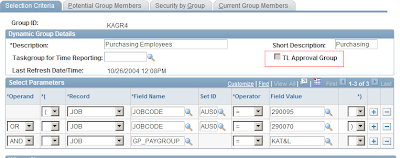 When a Dynamic/Static group is selected as a 'TL Approval Group' - it will be used only as a group of potential approvers and not for row security. Row Level security cannot be attached to these groups and they can be used in the AWE Definition Ids for Time and Labor to specify the user list that approves time.
So do we need Dynamic Groups anymore in Time and Labor?
There are two areas where the use of Dynamic Groups are significant:
1. As a parameter for running the Time Administration process. Dynamic Groups will still remain to be a very useful run control parameter for running the time administration process.
2. Grouping approvers together for use in some of the T&L specific AWE definition Ids. This is a change introduced in version 9.1 in the definition of a dynamic group. A new field called 'TL Approval Group' has been introduced in 9.1 as shown below:
 When a Dynamic/Static group is selected as a 'TL Approval Group' - it will be used only as a group of potential approvers and not for row security. Row Level security cannot be attached to these groups and they can be used in the AWE Definition Ids for Time and Labor to specify the user list that approves time.
Peoplesoft 9.1 - Time and Labor: Changes to TRC Setup
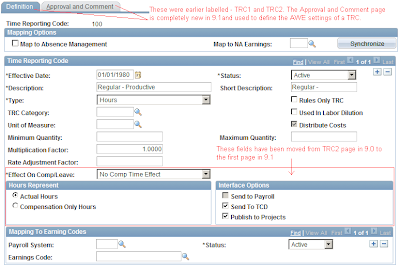
The setup component in Time and Labor that has changed significantly in 9.1 (more in terms of layout and additional features and less of fundamental data structure changes to the TL_TRC_TBL) is the TRC Setup page. Considering that the TRC is the fundamental building block of the module, it is imperative for us to understand the details of the change. The salient enhancements to the TRC Setup is as below:
 ------------------------------------------------------------------------------------------------
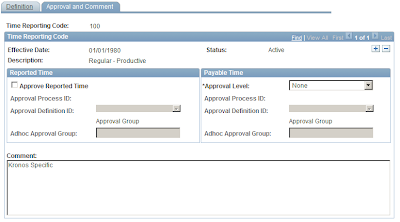 -------------------------------------------------------------------------------------------------
The major change as seen above is the introduction of the approval framewok settings. The adoption of AWE in Time and Labor has far fetched consequences, especially when one considers security and integration with Absence Management (it will now be imperative to synch up T&L security, Approval framework and Absence Approval framework). I am studying the technical architecture of the approval framework in T&L and will post about it in detail soon.
- A completely new page called 'Approvals and Comments' has added to the component. This is in conjunction with the introduction of the Approval Workflow Engine (AWE) framework in Time and Labor. The introduction of AWE is a major change and changes the way approvals are handled in Time and Labor. Earlier, the field called 'Approval Option' (where one could choose 'Reported Time', 'Payable Time' or 'None') controlled the way in which the TRC had to be approved. But this field has been taken off the page in 9.1 and a completely new page has been provided to fill in the AWE details for each TRC. This setup is similar to the familiar 'Country Take' setup in Absence Management, where we attach an Approval Process Id to each Absence Take that is exposed in Self Service.
- The fields that were present in the page called 'TRC2' in prior versions have been moved over to the first page of the definition. These fields include Effect on Comp/Leave, Hours Represent, Interface options etc.
- The tabs have been renamed to Definition and Approval and Comments from TRC1 and TRC2.
 ------------------------------------------------------------------------------------------------
 -------------------------------------------------------------------------------------------------
The major change as seen above is the introduction of the approval framewok settings. The adoption of AWE in Time and Labor has far fetched consequences, especially when one considers security and integration with Absence Management (it will now be imperative to synch up T&L security, Approval framework and Absence Approval framework). I am studying the technical architecture of the approval framework in T&L and will post about it in detail soon.
Peoplesoft 9.1 - Time and Labor: Changes to TRC Category Setup
TRC Category was introduced by Oracle in version 8.9 and I had written about it in a previous post. Oracle has given a face lift to this definition in 9.1 adding two new fields in the TRC Category definition - Reported Time Approval Display and Payable Time Approval Display. The new page is shown below:
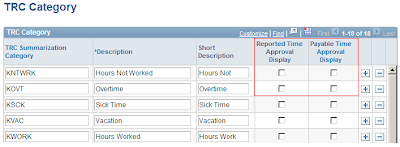
A maximum of three categories can be chosen to be displayed in the reported time and payable time approval pages. We can classify this change more as a cosmetic one impacting the layout of the time approval pages and the structure of the TRC Category changes - all in all, goes one small step in improving the usability of the application.

A maximum of three categories can be chosen to be displayed in the reported time and payable time approval pages. We can classify this change more as a cosmetic one impacting the layout of the time approval pages and the structure of the TRC Category changes - all in all, goes one small step in improving the usability of the application.
Peoplesoft 9.1 - Time and Labor: Viewing Unprocessed Time
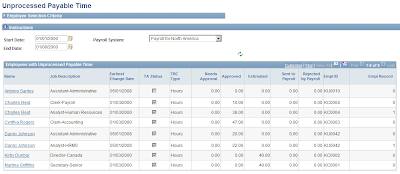
Oracle has strategically combined Time and Labor, Absence Management, NA Payroll and Payroll Interface into a category called 'Time and Pay' modules (interesting that Global Payroll has been maintained outside this classification!). One of the thrust areas of 9.0 as well as 9.1 has been about improving the integration and audit around these modules. Oracle took a visionary step in integrating absence self service into Time and Labor in 9.0, which I reckon is singularly the most important and useful feature upgrade from a T&L perspective after the changes to the schedule definition architecture in 8.9. For a shop that runs Absence Management, Time and Labor and Payroll for North America, the biggest challenge is to reconcile the interconnected data between the three modules - I've seen major glitches in the integration between Absence Management and Time and Labor in 8.9, which invariably leads to data inconsistency between the three modules and worse, has a negative impact in terms on Payroll compliance. While I expect much of the loose ends to be tied with the enhanced integration of Absence Management and T&L in 9.0 and above, it was really heartening to note that Oracle has provided two new pages to review unprocessed reported and payable time in 9.1. I am sure my folks in the payroll team would love that - to see which all rows did not get over to Payroll from Payable time and to see the rows in reported time not processed by Time Admin (it's not great drooling into PS Query reports all the time!).
The new pages can be found under the following navigation:
Time and Labor --> View Time --> View Unprocessed Time.
The page to view unprocessed payable time is given below:
 On the flip side - I am slightly let down by the fact that Oracle did not come out with more delivered reports in 9.1 - we are still stuck with the same old Time Card, Scheduled Hours, Payable Status and TCD Usage reports. Any area related to Payroll requires extensive reporting and auditing and it would be great for Oracle to come out with something like a Payroll dashboard that would integrate data between AM, T&L and NA Payroll. The job to audit the data consistency between these three modules is not straight forward and easy, while it is critical for business to get the numbers spot on - wouldn't it be wonderful to have an off the shelf suite to audit the entire payroll data and certify that what is being paid out is the correct amount? I would love to see that!
The new pages can be found under the following navigation:
Time and Labor --> View Time --> View Unprocessed Time.
The page to view unprocessed payable time is given below:
 On the flip side - I am slightly let down by the fact that Oracle did not come out with more delivered reports in 9.1 - we are still stuck with the same old Time Card, Scheduled Hours, Payable Status and TCD Usage reports. Any area related to Payroll requires extensive reporting and auditing and it would be great for Oracle to come out with something like a Payroll dashboard that would integrate data between AM, T&L and NA Payroll. The job to audit the data consistency between these three modules is not straight forward and easy, while it is critical for business to get the numbers spot on - wouldn't it be wonderful to have an off the shelf suite to audit the entire payroll data and certify that what is being paid out is the correct amount? I would love to see that!
Peoplesoft 9.1 - Time and Labor Rule Utilities
When I wrote my wish list for Time and Labor in April, one of the features I really wanted to see was a utility in T&L to migrate rules across environments, as currently it was a cumbersome process of writing manual export and import DMS scripts and manually recompiling all the rules in the target environment. I am really happy to note that Oracle has included that utility in the 9.1 release (surprising though that they never highlighted that feature in any of the pre-release announcements or transfer of information sessions). So what is new in 9.1 related to rule migration?
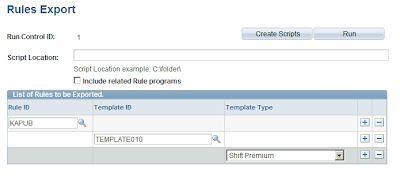
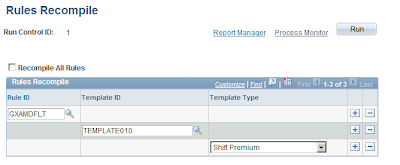
Oracle has introduced three new pages for exporting, importing and recompiling rules. This is pretty similar to the Rule Packager utility in Global Payroll and can be found under the familiar navigation of:
Setup HRMS --> System Administration --> Utilities --> Build Time and Labor rules.
The utility uses an Application Engine program to create DMS scripts in the location mentioned on the page. The utility used for exporting rules is shown below:
The page used for recompiling rules is shown below:
My thumps up to Oracle for providing these very needed utilities in 9.1 - this is something the developer community was longing for a long time. In hindsight, projects that are not yet on 9.1, should be looking at building a custom process mimicking the ones mentioned above to automate the process of T&L rule migration, may be I will write on this in detail sometime later.
Oracle has introduced three new pages for exporting, importing and recompiling rules. This is pretty similar to the Rule Packager utility in Global Payroll and can be found under the familiar navigation of:
Setup HRMS --> System Administration --> Utilities --> Build Time and Labor rules.
The utility uses an Application Engine program to create DMS scripts in the location mentioned on the page. The utility used for exporting rules is shown below:

The page used for recompiling rules is shown below:

My thumps up to Oracle for providing these very needed utilities in 9.1 - this is something the developer community was longing for a long time. In hindsight, projects that are not yet on 9.1, should be looking at building a custom process mimicking the ones mentioned above to automate the process of T&L rule migration, may be I will write on this in detail sometime later.
Sunday, October 18, 2009
The deceiving case of the 'Exceptional Scenario'
Two weeks back I had to drop my dad in the railway station for a night train. This particular railway station was one where very few trains had a stop and thus it's location was not familiar to many people.The first time I had to go to that place, I looked up Google Maps and it presented me with three alternate routes. Two routes were through small and confusing roads and were shorter than the third route where I had to take the national highway and then turn to local street roads which were much clearer than the first two options. I picked the third option, irrespective of it being longer, because there was an element of 'risk' involved in trying out small and confusing roads especially when you have a train to catch! The story goes on that I had to go to the station thrice (before this incident of dropping my dad) and all the time I took the national highway route, the route was perfect and hassle free except for a small stretch of road, about 200 meters which connected the main road to the station. That final stretch was through a slum like area, the road was just wide enough for a car and bike to go and I was confused whether it was a public road at all as the residents seemed to treat the road as an extension of their houses. The place had a unique co-existence of , Hindu, Christian and Islamic places of worship next to each other and every time I drove through that lane, the people used to have some celebration or the other (I appreciated the element of religious harmony, but not the prospect of having to drive through that narrow piece of road with people dancing around!). One day while I dropped my parents and was going back, I was forced to take another route (one of the first two options given by Google Maps) and found that even though I had to go through dingy roads, it was much shorter than the highway route as prescribed by Google Maps, but I could not exactly correlate the roads and the turns I had to take to reach the station as it was night time.
Now let's pan back to me dropping my dad! The train was at 9:30 PM and the drive takes around 45 minutes. We started from my home at 8:15 PM and I was juggling the two routes I could take - through the highway or through the shorter new route which I found the last time I came back after dropping my folks. The highway route was longer and I had to go through that last 200 meter stretch where I had the 'risk' of the entire road being blocked because of some celebration or the other. But nothing of that sort had happened anytime when I went there before - where the entire road was blocked and I could not reach the station, yes there was an outside possibility that it could happen, but that 'scenario' had never happened and was very 'rare'. The alternate route on the other hand was indeed shorter, but much more 'uncertain' and 'complex' than the highway route - there was a pretty high probability that I could take a wrong turn and lose my way and eventually my dad could end up missing the train, but that road did not present me with any possibility of being blocked - which mean that if I was able to find the correct way and take the correct turns, I had an almost 100% probability of reaching the station.
Which option should have I taken and why?
Well, this is not a suspense thriller (though it came close to it, my dad did not have to turn superman and chase the train to board it!!), so no spoilers in here - I took the 'tried and tested' highway route, had a smooth ride on the highway and reached the last 200 meter stretch in almost 30 minutes, I turned into the small road, drove for around 50 meters and tragedy struck! The entire road ahead was blocked by an idol of Virgin Mary and people were dancing and singing around it!! The station was just 150 meters ahead and I could not let my dad walk in the night through that area, there was only one option left - take a U turn and find a new way!! Finding a new way at the eleventh hour was a risk I did not want to take, so I had to do the most deplorable act of asking my dad to take a rickshaw and go to the station. The story had a not-so-tragic ending with my dad reaching the station before the train arrived and I kissed him goodbye (I followed the rick to reach the station! Shame on me!!).
That incident made me reflect on some of the design decisions and risk evaluations that we make in our projects. This is a very typical scenario - two alternate solutions are proposed for a problem. Solution 'A' is pretty straightforward using proven technology and easy to implement, the developers vouch that it will work for nine out of ten cases and the one case where it will fail being a very rare one. Solution 'B' on the other hand is a more complex and difficult one (but not impossible), using technology and methods which are not commonly used, but it will work for all scenarios. I have seen that majority of the time, Solution 'A' will be chosen and signed off by even the business team, vouching that they would handle that one exceptional scenario manually. The usual justifactions for this decision is the time saved by going for 'A' and the opinion that the incremental advantage accrued by fixing 1% of the exceptional cases cannot be justified by the increased effort and cost involved in developing solution 'B'.
I am convinced that the risk of the 'rare case' or 'exceptional condition' can be under-evaluated during the design phase and could strangle the entire operations if it does happen sometime (statistically it will!!). Even if it does not disrupt the operations, it could turn out to be an administrative menace over the long run for business users. This is something I have learnt during my support experience in TESCO, that seemingly trivial issues ignored during the development phase becomes a headache once the system goes live and once the organisation grows and the number of transactions increase. At this stage, extra effort will have to be spent in finding a solution to the problem, which in turn increases the cost of ownership of the product (the IT Support/ Maintenance team on the other hand would be happy, because it represents an opportunity to 'improve the system' and they can flaunt the 'savings' accrued by the fix in their quarterly metrics! It really doesn't speak volumes when you fix a defect downstream, though it is a great help for the business plugging holes in the system, it is highly undesirable and should be ideally captured during the development phase).
The argument that the cost involved in solving 1% of the issues is not justified stands true only when cost is calculated over the development phase. But if one considers 'Total Cost of Ownership (TCO)', which would be the cost of developing as well as supporting the system over it's entire life time, it can very easily be understood that the extra cost and effort incurred during the development phase to develop a fool-proof solution will lead to lesser maintenance issues and thus lesser TCO. (Considering the fact that typical development phases extend somewhere between 8 months to 2 years, while support phases will run into years and decades).
So in conclusion, I would like to state that when presented with alternate solutions, the choice should always go to the fool-proof one, even if it will take more effort and cost - because the money saved in the development phase by going for a quicker fix that works 99% of the time, will be lost during the support phase handling 1% of the exceptions over the course of the system.
P.S.: This issue and many others bring to the fore, the need for 'System Thinking'. I think that it is one of the most powerful management thoughts ever, but unfortunately is more linked to the way you look at a problem and is not a 'tool set' that can be easily implemented, which should explain why this great idea finds very little practical application. The fact is that IT projects are driven in such a manner that development and support are done by completely different teams and in many cases by different organisations - this takes away the accountability of developers and the organisation that carries out the development on the issues that prop up during the support phase and most developers have only done development and have never been in support, which cripples their ability to foresee possible issues and their impact. The way I see it, it is the customer that loses out it in the end - the IT teams, let it be development or support comes out clean in the whole act - once the product has been implemented the development team moves on to other engagements, while the support team gets more work fixing the issues left over unattended during development - it is the customer that gets caught in between. The world is not perfect nor ideal and from an ethical point of view, these are all not deliberate decisions that people make (in most cases) ('they signed off the design, so don't blame me!!', 'we had brought up that risk during the design phase, but even the business agreed to it', 'it is important that we meet the deadline, so considering the fact that the solution meets 99% of the cases, we should go with it' etc) - but can't we take small steps and decisions to improve the probability of perfection, not of the world, but atleast of the IT systems that we design?
Now let's pan back to me dropping my dad! The train was at 9:30 PM and the drive takes around 45 minutes. We started from my home at 8:15 PM and I was juggling the two routes I could take - through the highway or through the shorter new route which I found the last time I came back after dropping my folks. The highway route was longer and I had to go through that last 200 meter stretch where I had the 'risk' of the entire road being blocked because of some celebration or the other. But nothing of that sort had happened anytime when I went there before - where the entire road was blocked and I could not reach the station, yes there was an outside possibility that it could happen, but that 'scenario' had never happened and was very 'rare'. The alternate route on the other hand was indeed shorter, but much more 'uncertain' and 'complex' than the highway route - there was a pretty high probability that I could take a wrong turn and lose my way and eventually my dad could end up missing the train, but that road did not present me with any possibility of being blocked - which mean that if I was able to find the correct way and take the correct turns, I had an almost 100% probability of reaching the station.
Which option should have I taken and why?
Well, this is not a suspense thriller (though it came close to it, my dad did not have to turn superman and chase the train to board it!!), so no spoilers in here - I took the 'tried and tested' highway route, had a smooth ride on the highway and reached the last 200 meter stretch in almost 30 minutes, I turned into the small road, drove for around 50 meters and tragedy struck! The entire road ahead was blocked by an idol of Virgin Mary and people were dancing and singing around it!! The station was just 150 meters ahead and I could not let my dad walk in the night through that area, there was only one option left - take a U turn and find a new way!! Finding a new way at the eleventh hour was a risk I did not want to take, so I had to do the most deplorable act of asking my dad to take a rickshaw and go to the station. The story had a not-so-tragic ending with my dad reaching the station before the train arrived and I kissed him goodbye (I followed the rick to reach the station! Shame on me!!).
That incident made me reflect on some of the design decisions and risk evaluations that we make in our projects. This is a very typical scenario - two alternate solutions are proposed for a problem. Solution 'A' is pretty straightforward using proven technology and easy to implement, the developers vouch that it will work for nine out of ten cases and the one case where it will fail being a very rare one. Solution 'B' on the other hand is a more complex and difficult one (but not impossible), using technology and methods which are not commonly used, but it will work for all scenarios. I have seen that majority of the time, Solution 'A' will be chosen and signed off by even the business team, vouching that they would handle that one exceptional scenario manually. The usual justifactions for this decision is the time saved by going for 'A' and the opinion that the incremental advantage accrued by fixing 1% of the exceptional cases cannot be justified by the increased effort and cost involved in developing solution 'B'.
I am convinced that the risk of the 'rare case' or 'exceptional condition' can be under-evaluated during the design phase and could strangle the entire operations if it does happen sometime (statistically it will!!). Even if it does not disrupt the operations, it could turn out to be an administrative menace over the long run for business users. This is something I have learnt during my support experience in TESCO, that seemingly trivial issues ignored during the development phase becomes a headache once the system goes live and once the organisation grows and the number of transactions increase. At this stage, extra effort will have to be spent in finding a solution to the problem, which in turn increases the cost of ownership of the product (the IT Support/ Maintenance team on the other hand would be happy, because it represents an opportunity to 'improve the system' and they can flaunt the 'savings' accrued by the fix in their quarterly metrics! It really doesn't speak volumes when you fix a defect downstream, though it is a great help for the business plugging holes in the system, it is highly undesirable and should be ideally captured during the development phase).
The argument that the cost involved in solving 1% of the issues is not justified stands true only when cost is calculated over the development phase. But if one considers 'Total Cost of Ownership (TCO)', which would be the cost of developing as well as supporting the system over it's entire life time, it can very easily be understood that the extra cost and effort incurred during the development phase to develop a fool-proof solution will lead to lesser maintenance issues and thus lesser TCO. (Considering the fact that typical development phases extend somewhere between 8 months to 2 years, while support phases will run into years and decades).
So in conclusion, I would like to state that when presented with alternate solutions, the choice should always go to the fool-proof one, even if it will take more effort and cost - because the money saved in the development phase by going for a quicker fix that works 99% of the time, will be lost during the support phase handling 1% of the exceptions over the course of the system.
P.S.: This issue and many others bring to the fore, the need for 'System Thinking'. I think that it is one of the most powerful management thoughts ever, but unfortunately is more linked to the way you look at a problem and is not a 'tool set' that can be easily implemented, which should explain why this great idea finds very little practical application. The fact is that IT projects are driven in such a manner that development and support are done by completely different teams and in many cases by different organisations - this takes away the accountability of developers and the organisation that carries out the development on the issues that prop up during the support phase and most developers have only done development and have never been in support, which cripples their ability to foresee possible issues and their impact. The way I see it, it is the customer that loses out it in the end - the IT teams, let it be development or support comes out clean in the whole act - once the product has been implemented the development team moves on to other engagements, while the support team gets more work fixing the issues left over unattended during development - it is the customer that gets caught in between. The world is not perfect nor ideal and from an ethical point of view, these are all not deliberate decisions that people make (in most cases) ('they signed off the design, so don't blame me!!', 'we had brought up that risk during the design phase, but even the business agreed to it', 'it is important that we meet the deadline, so considering the fact that the solution meets 99% of the cases, we should go with it' etc) - but can't we take small steps and decisions to improve the probability of perfection, not of the world, but atleast of the IT systems that we design?
Friday, October 2, 2009
Can you implement T&L without Absence Management?
I found this very interesting question in ITToolBox yesterday and thought would 'type in' (I would have scribbled or jotted few years back!!) my opinion on this. Let me restate the exact question as it appeared in the forum:
"We are trying to do an analysis of using Absence Manager without Time and Labor. We already have a customized module that feeds online timecards to payroll in peoplesoft. First, is this possible? If so, what functionality would we be missing out on? Everything I have read talks about them together. Is AM just the workflow piece?"
Though the user did not mention their actual requirement, the obvious answer is yes - traditionally over the years T&L has been implemented as a different module from Absence Management. May be the understanding of what these two modules do might help the user take an informed choice.
Absence Management is a module that is specifically designed to manage leaves - that's all it does. It is a very elegant and powerful module that can handle all types of leave accruals, carry forwards, prorations, workflows for approvals etc. It is interesting to note that before AM gained the popularity that it enjoys today, organisations have used Benefits, Monitor Absence in Workforce Admin and even T&L to manage leaves. Absence Management is an independent module and can be implemented standalone with core HRMS.
Time and Labor on the other hand is a much more diverse module that can handle time reporting of employee, track compensatory time offs, enable task based time reporting, calculate overtime and shift premiums etc. If there are no complex rules, T&L can also double up as the module handling leaves of your organisation.
The interdependence of the two modules has to be a thing of version 9.0. With version 9.0, T&L and AM have been coupled very tightly, where entire absence self service has almost been integrated in the timesheet. This could be the reason why it looks as if they cannot be implemented separately.
But the fact remains that both of them are independent modules and the choice of which module to use should completely depend on the depth and nature of your organisation's requirement.
"We are trying to do an analysis of using Absence Manager without Time and Labor. We already have a customized module that feeds online timecards to payroll in peoplesoft. First, is this possible? If so, what functionality would we be missing out on? Everything I have read talks about them together. Is AM just the workflow piece?"
Though the user did not mention their actual requirement, the obvious answer is yes - traditionally over the years T&L has been implemented as a different module from Absence Management. May be the understanding of what these two modules do might help the user take an informed choice.
Absence Management is a module that is specifically designed to manage leaves - that's all it does. It is a very elegant and powerful module that can handle all types of leave accruals, carry forwards, prorations, workflows for approvals etc. It is interesting to note that before AM gained the popularity that it enjoys today, organisations have used Benefits, Monitor Absence in Workforce Admin and even T&L to manage leaves. Absence Management is an independent module and can be implemented standalone with core HRMS.
Time and Labor on the other hand is a much more diverse module that can handle time reporting of employee, track compensatory time offs, enable task based time reporting, calculate overtime and shift premiums etc. If there are no complex rules, T&L can also double up as the module handling leaves of your organisation.
The interdependence of the two modules has to be a thing of version 9.0. With version 9.0, T&L and AM have been coupled very tightly, where entire absence self service has almost been integrated in the timesheet. This could be the reason why it looks as if they cannot be implemented separately.
But the fact remains that both of them are independent modules and the choice of which module to use should completely depend on the depth and nature of your organisation's requirement.
Saturday, September 12, 2009
Support.Oracle.Com is here
How I welcome the new site for product support from Oracle! https://support.oracle.com is a very very welcome change from the clumsy erstwhile metalink website. For users who were comfortable with the Peoplesoft's customer connection site, navigating and raising a Service Request in Oracle's Metalink site was a night mare, it was terribly slow and required tons of clicks to get somewhere, add to add, finding the required information and product was incredibly difficult on Metalink.
But the new site for product support is an excellent one by my initial experience. Oracle has really gone in for flashy Web 2.0 features and Ajax and DHTML are heavily sprinkled all over the site. User friendly pagelets, saner page layouts, DHTML driven menu bars and an extremely improved process to raise Service Requests gives a rich experience to the users. I am particularly impressed with the redesigned SR creation process. A new window which summarises the information and points out the fields that a user has missed to fill are extremely handy. The image below shows the new Ajax enabled Oracle support site with a refreshing layout and design, note the small bar on the left side of the page alerting the users of the status of the IR. All in all, a neat job from Oracle!
But the new site for product support is an excellent one by my initial experience. Oracle has really gone in for flashy Web 2.0 features and Ajax and DHTML are heavily sprinkled all over the site. User friendly pagelets, saner page layouts, DHTML driven menu bars and an extremely improved process to raise Service Requests gives a rich experience to the users. I am particularly impressed with the redesigned SR creation process. A new window which summarises the information and points out the fields that a user has missed to fill are extremely handy. The image below shows the new Ajax enabled Oracle support site with a refreshing layout and design, note the small bar on the left side of the page alerting the users of the status of the IR. All in all, a neat job from Oracle!

Peoplesoft 9.1 - Release Value Proposition for Time and Labor
Oracle's coming out with some welcome enhancements to Time and Labor in the 9.1 release. The release value proposition (RVP) document which highlights the major feature additions to the various modules talk about the following enhancements to T&L:
- Integration with Oracle Workforce Scheduler: I had mentioned this in a previous post and it will be a major product enhancement and offering from Oracle. I am raring to see how this integration works in 9.1 and I am sure a number of customers would love to have this feature in their enterprise application suites for workforce management.
- Adoption of Approval Workflow Engine for T&L approvals: A number of HRMS modules like Absence Management has been using AWE from version 8.9, while the T&L application development team stuck to the traditional row security and time and labor groups driven approval. It is good to bring T&L to the fold of modules using AWE as organisations will be able to maintain the approval rules under a single framework. It will be interesting to see though how customers who are using custom T&L Dynamic group driven approval routings will migrate to AWE - I see some retrofit work there.
- Adoption of Delegation Framework in T&L: Oracle started offering the delegation framework in version 9.0 and it is a welcome move that even T&L has moved over to that fold.
Subscribe to:
Posts (Atom)