Showing posts with label Oracle Learn Cloud. Show all posts

Friday, June 10, 2016

Learning Plans - The Swiss Army Knife of Oracle Learning Cloud

Jim manages the Learning & Development team of a large automobile component manufacturing company with a 10,000+ workforce. They have manufacturing plants across 5 locations in Asia, with sales and service offices spread across 20 countries. One of the critical KPIs of the L&D function is to administer multiple mandatory courses with varying eligibility and completion rules. One of his biggest challenges is to deliver Health and Safety compliance certification to over 3,000 employees and contractors working in the manufacturing plants. All these workers have to certify themselves after viewing 3 eLearning courses every 6 months and all new workers have to complete this within the first week of their assignment to the plants. While this is monitored on a weekly basis by site HRs, Jim keeps a constant tab of any non-compliance using their global LMS.

So, if you were to implement Oracle Learning Cloud (Taleo Learn) for Jim, how would you handle this requirement?

Enter Learning Plans


Learning Plans is the swiss army knife of Taleo Learn. Brandish it to deliver any type of program/curriculum based learning. Think of Learning Plan as a container that can pack different types of learning items for specific purposes.
Learning Plans - The Swiss Army Knife of Oracle Learning Cloud

 Let's take the case of Jim to illustrate this. His new hire health and safety training involves a set of 3 eLearning courses that need to be completed within a week of being assigned to the employees. Learning Plan is a way of packaging these 3 courses in one set, setting the required deadline, reminders, notifications and assigning it to required employees. For new employees in sales, Jim has a much larger Learning Plan that involves the new hires attending class room based orientations and field assignments. A Learning Plan can effectively combine multiple types of learning items like eLearning, Class room based training, tests and assessments, offline learning etc.

Auto-Enrollment through Groups

One key element of the Learning Plan functionality is the ability to auto-enroll employees into Learning Plans using dynamic groups. So, Jim can define rules to auto-enroll all manufacturing new hires into the Health and Safety Learning Plan, while to move all Sales new hires into the Sales Learning plan. While reducing the administrative overhead is a benefit brought in by this auto-enrollment feature, a more strategic advantage is the ability to push employees into specific Learning Plans based on their attributes. For eg. let's say you have a Future Manager learning path where high potential employees are enrolled into. Once you identify an employee as eligible for this program in Learn (will need a custom field to indicate this), he/she can be automatically enrolled into the Future Manager Learning Plan.

Well, but remember that Jim also has to assign this plan every six months to his manufacturing employees? How do we do that?

Enter Recurring Learning Plans.....Learning Plans reloaded!
In v16A of the product, Oracle has introduced an enhancement to the Learning Plan feature. Now you can define Learning Plans as "Recurring"
Recurring Learning Plans can be defined to handle recurring learning needs
This feature gives you the ability to recur a Learning plan within a specific interval (defined in days or months) as well as sent reminders before the Learning Plan is to expire. This key enhancement is exactly what customers like that of Jim in industries with heavy compliance requirements will be looking for.

All in all, Learning Plans is an extremely powerful feature that can be creatively used to meet a number of functional use cases. I am sure you will have lot of fun exploring this feature further.

Thursday, June 2, 2016

Kirkpatrick Model Level3 evaluation in Taleo Learn

One of the most common models used for measuring training effectiveness is the Kirkpatrick Model. This model measures four levels of training effectiveness as shown below:

The four levels of evaluation in Kirkpatrick Model

Measurement of first and second levels is straightforward and can be easily handled in Taleo Learn. Level 3 measures the impact of training on performance of the employee/degree of behavioral change. Typically, these are measured after the training and involves the employee's supervisor who provides a feedback on the observed impact on performance of the training.

Taleo Learn facilitates Level 3 measurement using the concept of "Delayed Surveys". Delayed Surveys can be used to send out an evaluation form or survey to an employee's manager, specific number of days after the completion of an Instructor Lead Training session. The steps to setup a Delayed Survey is as below:

1. Create a new assessment with type of "survey" and define the questions that need to be part of the Level 3 evaluation.
2. Once the assessment has been created, create a survey as shown below, where you can mention the number of days after the course completion when you need the survey to be sent out.

Setup of a delayed survey requires you to fil up the "Number of days to delay survey delivery" option

3. Select the assessment created in step 1 and attach to the "Supervisor Survey" option on the above page. This will send out the selected survey questionnaire to the employee's supervisor
4. Add the Delayed Survey dynamic object on your Learn homepage, so that managers can view any delayed survey that has been sent to them.
5. Enable reports to view results of the Level 3 survey provided
6. Review notifications related to delayed survey and enable/modify as required.

As they say, 'you can't manage what you can't measure' and the measurement of impact of training on day to day job performance of an employee is a critical performance index for any organization. While delayed surveys is a powerful mechanism to measure this, you can also look at extending L3 measurement to performance reviews, development conversations and your employee surveys.

Monday, May 30, 2016

On the Bulk Loader feature in Taleo Learn

With thousands of enrollments, mass updates of attendance, mass creation of courses etc. Learning Management is easily one of the most transaction intensive of HR processes. Let's look at some of the business scenarios where mass transactions are involved in a typical learning management process:

1. Instructor Lead Training schedule/calendar to be updated in the LMS
2. Enrolling all new hires into a compliance course
3. Updating attendance of all employees who attended an Instructor Lead Training session
4. Enrolling High Potential employees into a Leadership development program
5. Migration of learning history from a previous LMS

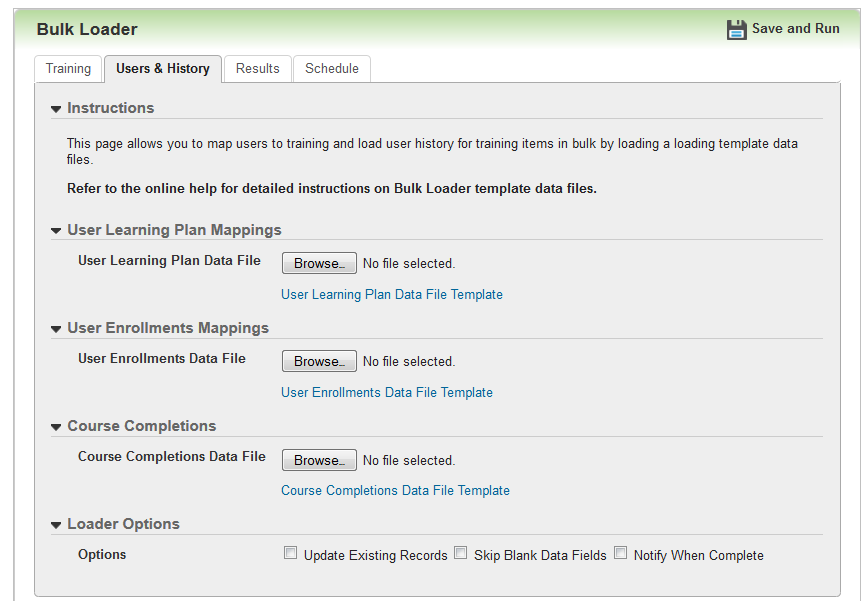
To cater to such requirements of mass transactions, Oracle Learning Cloud (Taleo Learn) introduced the 'Bulk Loader' features few releases back. The bulk loader feature which started off with options to mass create Instructor Lead Trainings (ILTs), has been significantly expanded in the latest release to cover the following functionalities:

a. Create/Update ILT events, tracks, sessions, enrollment
b. Create Learncenter authored courses
c. Map items to categories
d. Manage pre and post-enrollment status of employees
e. Map employees to Learning Plans
f. Manager course completion status of employees

Bulk Loader is available in the Configuration center of Oracle Learning Cloud, allowing L&D administrators to carry out these transactions directly from the web UI. The tool is extremely intuitive as it works like a guided process and provides file templates to be used as well. L&D Administrators should be able to utilise this with minimal or almost no training (which is what cloud solutions are all about).

This feature brings in important considerations from an implementation standpoint as well:

1. Now, partners and customers will be able to carry out migration of training history into Oracle Learning Cloud, without depending on Oracle Consulting. This was earlier restricted only to Oracle Consulting, but bulk loader opens this up for the partner ecosystem, which is great!

2. Post-enrollment status can be updated using bulk loader now. This addresses the need to update 'attendance'/'completion' details of Instructor Lead Trainings. Note that bulk loader can also be scheduled now, bringing in the possibility to automate the updation of post-enrollment statuses in case attendance for a class is tracked externally.

3. A good amount of the initial ILT setup, typically done during the cutover to the product can now be managed through bulk loader.

4. Ensure that the L&D Administrators are fully aware of this feature as this will help to minimise administrative overheads during operations. L&D Admins should love this feature as it involves zero technical overhead!

All in all, this is a great addition to the product which should be utilized by implementation consultants and L&D Administrators alike. 

Saturday, September 5, 2015

Adding a Widget into the Classic WYSIWYG Page editor in Taleo Learn

With 15A version of Oracle Learn Cloud (formerly Taleo Learn), Oracle has introduced the first version of widgets. Widgets are an alternative to the existing dynamic objects, presented with responsive page design and a much more slick UI. The first (and only) widget available with 15A/15B is the widget for Learning Plans. A sample is given below.


As documented, the widgets can be embedded only into the new page designer introduced with 15A and cannot be directly embedded into the classic WYSISYG pages. But, there is a workaround for you to achieve this. Follow the below steps:

1. Create the Widget
2. Create a Page and embed the Widget in the page
3. Open up the classic WYSIWYG page, where you want to invoke the widget
4. In the HTML section, add the below code:


For Page Number - give the page number generated in step 2
For PageName - give the page name provided in step 2

A sample is given below:

Saturday, August 1, 2015

Capturing Training Interest in Oracle Learn Cloud


Training Needs Analysis is an integral part of most corporate learning and development strategy. While majority of the training needs are based on the overall organizational strategy and capabilities, it is important to gather individual training needs as well.

In this post we look at utilising the "Training Offerings" feature available in Oracle Learn cloud (formerly Taleo Learn) to enable training departments gauge interest for specific training items. 

Introducing the Training Offerings feature
Let's take the example of a Corporate Information Security compliance training that all employees need to complete within 3 months of joining a company. The company offers an online course as well as class room based training sessions for this. Employees can attend either the classroom training or the online course to complete the Information Security training. This is where Training Offerings come in. Training Offerings allow Learning and Development departments to bundle in multiple training methods into a single collection, giving employees the flexibility to take up the mode of training that suits them best and complete the overall training. 

Utilising Training Offerings to gauge employee training needs analysis
You can create a Training Offering without linking any learning items to it. This empty Training Offering can be opened up to employees to mark their interest in the offering. When a learning item is added to the training offering later on, the employees who showed their interest will be notified of the same. Similarly, the administrator of the Training Offering can view the employees who have shown interest for specific training offerings.

As shown in the image below, employees can indicate their interest for a potential training offering by clicking on the "envelope icon" next to an offering:


The image below shows the Administrator view of Training Offerings, where the administrator can view the employees who have expressed interest for a specific training offering


Post Note:
Driven by technology and workplace organisation changes, corporate learning is undergoing a tectonic transformation. In this new context where employees learn on the go and from sources far beyond the walls of a corporate learning system, where on-demand learning content can be generated - I would question the utility of a traditional training needs analysis itself. 


Oracle Learn Cloud - Adoption of Oracle Business Intelligence

Oracle Learn Cloud (formerly Taleo Learn) introduced Oracle Business Intelligence (BI) based reports from release 15A. BI Reports are in a beta release with existing Insight Reports still available for customers till end of 2015. With the upcoming Oracle Learn Cloud 15B release, Oracle also introduces the capability to define custom BI reports. For more information on Oracle Learn Cloud 15B release, follow this link.