Ran into a peculiar problem while writing to a file using File Layouts today. Fields that had
a space in the database was being converted to null while writing to the file. Did all the obvious
checks like ensuring the Trim Spaces and Strip White Spaces properties of the FileLayout were unchecked.
Then ran into the File Class property - UseSpaceForNull. This property was introduced in Peopletools 8.48 and does the neat job of ensuring that spaces are printed in the output file instead of nulls when attempting to print fields that indeed had a space in database. It is a read-write property and has to be used immediately after instantiating the file layout as shown below:
If &FILE1.IsOpen Then
If &FILE1.SetFileLayout(FileLayout.FL_NAME) Then
&FILE1.UseSpaceForNull = True;
Tuesday, April 20, 2010


Wednesday, April 14, 2010
Another use-case for PS-Microsoft Outlook Integration
I was walking towards my workstation when I heard an animated conversation between a manager and her reportees. The manager was instructing her reportees to make an entry in her Outlook calendar when they are on leave, so that she could plan her resources better. That just struck me that this was another potential area where we could use the integration between Peoplesoft and Microsoft Outlook on which I had written about here. That also got me thinking about the need to provide better views of team absences to managers. There are some excellent Calendar Views in Time and Labor, that gives complete information of scheduled hours, reported hours, exceptions etc. It is really imperative that such views are also delivered from the side of Absence Management - so that managers have a holistic view of their team's attendance.
P.S.: It's wonderful that Peoplesoft HCM 9.1 comes with an integration with Microsoft Outlook.
P.P.S: The Calendar views in Time and Labor does show reported absences, but only when the absences are brought to the timesheet.
P.S.: It's wonderful that Peoplesoft HCM 9.1 comes with an integration with Microsoft Outlook.
P.P.S: The Calendar views in Time and Labor does show reported absences, but only when the absences are brought to the timesheet.
Saturday, April 10, 2010
PS Query Classification Tool
As the manager of HR Shared Services one of the major initiatives Anand took up was to streamline the auditing processes of each business activity. This was needed as the organisation was growing bigger leading to larger HR transaction volumes, higher employee churning leading to the need to have documented processes to enable business continuity and the need for data accuracy. The biggest factor playing in Anand's mind was Payroll accuracy - given that his company was using Peoplesoft Global Payroll which had multiple feeder systems like Peoplesoft Absence Management, Time and Labor and Benefits - it was a nightmare for his team to ensure data consistency across the various modules. Anand worked closely with Praveen from the IT team to build audits at every stage of the payroll process and overtime the sheer number of audit queries became too large for the team to handle manually. With no tools at his disposal, Anand was forced to maintain the list of audit queries in an excel sheet which again had to be updated everytime a new query was added or retired. Praveen came to realise this constaint while working with Anand's team and thought why he could not develop a simple tool that will help Anand map a PS Query to the appropriate business process and also provide another page which would list all the PS Queries corresponding to a business process and let the users execute the query directly. He immediately got working on the idea and came up with the PS Query Classification Framework which he christened - QBox.
Anand just loved the tool as it helped him manage his audit process much better, his team mates could just access the QBox page and view all the up-to-date queries for a business process, now there was no way anyone would miss running a query and maintaining the query list was as easy as clicking a button!
Anand just loved the tool as it helped him manage his audit process much better, his team mates could just access the QBox page and view all the up-to-date queries for a business process, now there was no way anyone would miss running a query and maintaining the query list was as easy as clicking a button!
Query Classification Tool
View more presentations from jijucvengal.
Sunday, April 4, 2010
Absence Leakage Decision Chart
Praveen was visibly frustrated, well not without reason, as the lead Absence Management consultant he was bombarded with multiple calls from the business team - most of them talking about the same issue of users having reported absences but the same not getting paid out in payroll. These issues were serious because it affected the pay of the employees and had to be investigated on priority and it took a good half day to investigate, document and communicate the fix to the users (even though he was an expert in the module!). Couple of months into this routine, Praveen realised that better user training and tools could help HR users to troubleshoot this issue at the first level itself and he decided to prepare a decision chart for the same.
Praveen had long realised that Peoplesoft absence management was a complex module for business users to comprehend and better tools and charts were required to simplify navigation through the module. He conceptualised a simple seven step process to help users identify where the booked absence went missing. The below presentation details the decision chart prepared by Praveen:
As a matter of fact, not even a single call came to the IT team regarding missing absences after introducing this tool and Praveen has been smiling since then!!
Well, even today most customers and users are trying hard to wade through the issues and complexities presented by Peoplesoft Absence Management and does not have any tool or dashboard to see what is actually being paid out and whether any payroll over or underpayments are being made. If you feel you fall under this category of customers and would want better auditing and dashboards to track your Peoplesoft Time and Attendance and Payroll systems, it is time to get in touch with us!
Praveen had long realised that Peoplesoft absence management was a complex module for business users to comprehend and better tools and charts were required to simplify navigation through the module. He conceptualised a simple seven step process to help users identify where the booked absence went missing. The below presentation details the decision chart prepared by Praveen:
Peoplesoft Absence Leakage Decision Chart
View more presentations from jijucvengal.
As a matter of fact, not even a single call came to the IT team regarding missing absences after introducing this tool and Praveen has been smiling since then!!
Well, even today most customers and users are trying hard to wade through the issues and complexities presented by Peoplesoft Absence Management and does not have any tool or dashboard to see what is actually being paid out and whether any payroll over or underpayments are being made. If you feel you fall under this category of customers and would want better auditing and dashboards to track your Peoplesoft Time and Attendance and Payroll systems, it is time to get in touch with us!
Thursday, April 1, 2010
After a long hiatus - Looking up to 2010!
Time lost is lost forever - true and I've had three full months without any new posts....Personally it's been an exciting period for me - moving out of the lax groove of bachelorhood, being married to the woman I love and finding that the 'life' in 'work-life balance' indeed does exist!
Eventhough it's three months into the new year, let me wish all of you a wonderful year ahead - a year full of new and fruitful experiences and learning!
I am sure that 2010 is going to be more exciting than the last two years which saw companies freezing investment on HR projects eclipsed by the worst recession since 1930s. Things have already started to look up - companies are hiring Peoplesoft consultants in scores and dozens, organisations have lapped up version 9.1 in a big way and HRIT projects seem to be getting favour once again!
So, what is going to be my theme and focus in the year ahead? Undoubtedly it's got to be about finding better ways to give customers a better deal in Peoplesoft Time and Pay implementations. I believe it's time for us to offer specialised and holistic solutions in this space to our customers and look beyond words like 'deployment' or 'implementation'. Undoubtedly, any time and pay HR suite (includes Time and Labor, Absence Management and Payroll solutions) has a direct impact on the company's financials and it's extremely critical to get it right the first time. I am convinced that we have a long way to go in this space - simply implementing certain modules will not work in this case as any time and pay implementation requires extensive integration between the modules as well as with external systems, requires tight audits and most importantly, the real life scenarios are extremely difficult to simulate in a test environment. I will not be exaggerating when I say that there are a number of customers out there who are bleeding thousands of dollars every pay period due to the issues with their time and pay systems - don't they require a better deal? I am convinced that they do and it will be difficult to achieve that with the current approach to Peoplesoft implementation.
My focus over the next few months will be on conceptualising a better framework and approach to time and pay system adoption and this blog will be my mouthpiece!
Eventhough it's three months into the new year, let me wish all of you a wonderful year ahead - a year full of new and fruitful experiences and learning!
I am sure that 2010 is going to be more exciting than the last two years which saw companies freezing investment on HR projects eclipsed by the worst recession since 1930s. Things have already started to look up - companies are hiring Peoplesoft consultants in scores and dozens, organisations have lapped up version 9.1 in a big way and HRIT projects seem to be getting favour once again!
So, what is going to be my theme and focus in the year ahead? Undoubtedly it's got to be about finding better ways to give customers a better deal in Peoplesoft Time and Pay implementations. I believe it's time for us to offer specialised and holistic solutions in this space to our customers and look beyond words like 'deployment' or 'implementation'. Undoubtedly, any time and pay HR suite (includes Time and Labor, Absence Management and Payroll solutions) has a direct impact on the company's financials and it's extremely critical to get it right the first time. I am convinced that we have a long way to go in this space - simply implementing certain modules will not work in this case as any time and pay implementation requires extensive integration between the modules as well as with external systems, requires tight audits and most importantly, the real life scenarios are extremely difficult to simulate in a test environment. I will not be exaggerating when I say that there are a number of customers out there who are bleeding thousands of dollars every pay period due to the issues with their time and pay systems - don't they require a better deal? I am convinced that they do and it will be difficult to achieve that with the current approach to Peoplesoft implementation.
My focus over the next few months will be on conceptualising a better framework and approach to time and pay system adoption and this blog will be my mouthpiece!
Tuesday, December 1, 2009
Peopletools 8.50 supports UK English!
UK English has been added as a new language option available in Peopletools 8.50! I am sure that my folks in UK will be happy to hear that!!
Cheers to that!
Cheers to that!
Sunday, November 22, 2009
Peoplesoft HRMS 9.1: Changes to Time Approval setup and Functional Implications
I had discussed in my previous posts about the introduction of Approval Workflow Engine for Time and Labor in version 9.1. This post discusses the functional implications, changes and challenges this change poses in comparison to the Approval Process prevalent in previous versions.
A note on Time Approval in Time and Labor: Time can be approved at two levels - Reported Time or/and Payable Time. Whether reported time/payable time requires approval can be setup at the Workgroup as well as TRC level. If a TRC is set to have Reported Time approval, then the Time Administration process will not pick up time reported under that TRC unless it is approved. Similarly if a TRC is setup to have Payable Time approval, then a payable time row under that TRC will not be sent to any payroll system unless the payable time is approved.
How Approval Used to happen prior to 9.1: The approve reported time/payable time component in versions 8.9/9.0 was designed to retrieve all rows requiring approval for employees a user's security had access to. The logic used to derive the employees a user can see in a T&L MSS page is explained in this post. This meant that the user could approve the time of all users that he/she had access to as per the security settings.
What has changed in version 9.1: In 9.1, time approval is driven by the approval workflow engine (AWE). Oracle has delivered a number of approval definition ids - for example - approval by position management, supervisor id, department manager, position department manager, position supervisor, T&L approval group etc. Also, the approver in an AWE definition is determined by the 'User List' attached to the defintion id as shown below:
A note on Time Approval in Time and Labor: Time can be approved at two levels - Reported Time or/and Payable Time. Whether reported time/payable time requires approval can be setup at the Workgroup as well as TRC level. If a TRC is set to have Reported Time approval, then the Time Administration process will not pick up time reported under that TRC unless it is approved. Similarly if a TRC is setup to have Payable Time approval, then a payable time row under that TRC will not be sent to any payroll system unless the payable time is approved.
How Approval Used to happen prior to 9.1: The approve reported time/payable time component in versions 8.9/9.0 was designed to retrieve all rows requiring approval for employees a user's security had access to. The logic used to derive the employees a user can see in a T&L MSS page is explained in this post. This meant that the user could approve the time of all users that he/she had access to as per the security settings.
What has changed in version 9.1: In 9.1, time approval is driven by the approval workflow engine (AWE). Oracle has delivered a number of approval definition ids - for example - approval by position management, supervisor id, department manager, position department manager, position supervisor, T&L approval group etc. Also, the approver in an AWE definition is determined by the 'User List' attached to the defintion id as shown below:
 A 'User List' can be a SQL/Application Package code/Query or a Role that determines the operatorids to which the request should be routed for approval. Thus, the approvers of a certain request are determined by the user list attached to the AWE definition id. This means that HRMS security/T&L security no longer plays a role in determining the approver - and more importantly the fact that a certain user has security to view a particular employee in Time and Labor does not guarantee the fact that he/she will be able to view the time requiring approval of those employees.
What is the functional implication of this change:
> The biggest functional implication of this change will be the way Time and Labor administrators approve time. In previous versions, administrators could approve time of all employees they had access to by their core row level security or time and labor security. This will no more be the case in version 9.1 - even if the administrators will be able to view the employees' timesheets, they will no longer be able to approve reported/payable time by default. The user list logic of the AWE process definition will have to be customized to return administrators also as legitimate approvers if they have to have access to approve reported/payable time. In effect I would say that from version 9.1 - search security and approval security have been differentiated in Time and Labor with row level security controlling search and AWE user list controlling approval security.
> There is an option to 'Push Back' reported time in version 9.1. In previous versions, managers could either Approve or Deny reported time, but with version 9.1, managers can even push back reported time. This is a useful feature especially in case of an elapsed time configuration and users can make use of the notification functionality of AWE to notify the requester when an approver has pushed back the request.
> Challenges in data migration to version 9.1: In versions 8.9 and 9.0, there were only two tables related to reported/payable time approval and they were TL_RPTD_TIME and TL_PAYABLE_TIME. The SUBMITTED_STATUS and PAYABLE_STATUS fields in the respective tables were enough to pick out rows requiring approval and no special logic was required to find the approver of a request as approval and search security were unified. But this has undergone a sea change in version 9.1. With 9.1, there are separate AWE tables that store the 'header' and 'line' information of each transaction done in time and labor and the approval details will be picked from these header and line tables. For example, assume that you are moving from version 8.9 to 9.1 and at the time you are going live with Time and Labor 9.1, there are a bunch of Payable Time entries that have not yet been approved. How do you bring over this data to 9.1 and ensure that when the managers log into the 9.1 application, they will be able to see the pending payable time entries for approval? It will not be enough to just migrate the TL_PAYABLE_TIME table to 9.1, but the AWE tables will also have to be populated to ensure that time entries pending approval show up in version 9.1. Note that the AWE tables related to Time and Labor are newly introduced in version 9.1 and are not present in any previous version. I am noting below the important AWE tables for Time and Labor in 9.1:
Payable Time Approval:
Cross Reference Table: TL_APP_PAY_XREF
Header Record : TL_APP_PAY_HDR
Line Record : TL_APP_PAY_LINE
Note that this change could potentially affect any custom reports/processes that were designed around time approval in Time and Labor also.
Sunday, November 1, 2009
Peoplesoft 9.1 - Time and Labor: Dynamic Groups are dead, long live Dynamic Groups!
The pronouncement of the title does not hint that Oracle has taken away the definition of Dynamic and Static groups from Time and Labor, but it's significance is greatly reduced with the introduction of approval workflow engine in 9.1 and by the improved row level security framework in 8.9. In pre-8.9 days, the entire row level security in T&L used to be driven by Dynamic Groups and it used to be a design nightmare to arrive at the best security strategy as various modules drove security differently (at that point of time, frankly dynamic groups offered a pretty flexible way of driving security as it's design is distantly similar to the current robust row level security structure). But with the introduction of the very flexible and configurable row level security structure in 8.9, the need to use Dynamic Groups for row security in T&L, almost died down and now with the introduction of the AWE framework in 9.1 - I really do not see any more need to use Dynamic Groups for security purposes. This is more a message for current 8.9 and 9.0 Time and Labor implementations - you should discourage the use of T&L security driven by Dynamic Groups as much as possible and adopt the HRMS Row Level security in Time and Labor. The focus of Oracle has been towards adopting common frameworks across various modules for driving aspects like Security, Approval, Delegation etc. and it will be great to keep that point in mind while designing solutions in these areas if you are on versions lower than 9.1/9.0.
So do we need Dynamic Groups anymore in Time and Labor?
There are two areas where the use of Dynamic Groups are significant:
1. As a parameter for running the Time Administration process. Dynamic Groups will still remain to be a very useful run control parameter for running the time administration process.
2. Grouping approvers together for use in some of the T&L specific AWE definition Ids. This is a change introduced in version 9.1 in the definition of a dynamic group. A new field called 'TL Approval Group' has been introduced in 9.1 as shown below:
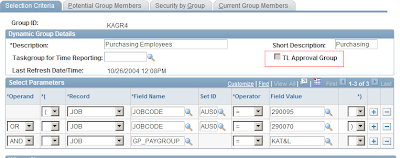 When a Dynamic/Static group is selected as a 'TL Approval Group' - it will be used only as a group of potential approvers and not for row security. Row Level security cannot be attached to these groups and they can be used in the AWE Definition Ids for Time and Labor to specify the user list that approves time.
So do we need Dynamic Groups anymore in Time and Labor?
There are two areas where the use of Dynamic Groups are significant:
1. As a parameter for running the Time Administration process. Dynamic Groups will still remain to be a very useful run control parameter for running the time administration process.
2. Grouping approvers together for use in some of the T&L specific AWE definition Ids. This is a change introduced in version 9.1 in the definition of a dynamic group. A new field called 'TL Approval Group' has been introduced in 9.1 as shown below:
 When a Dynamic/Static group is selected as a 'TL Approval Group' - it will be used only as a group of potential approvers and not for row security. Row Level security cannot be attached to these groups and they can be used in the AWE Definition Ids for Time and Labor to specify the user list that approves time.
Peoplesoft 9.1 - Time and Labor: Changes to TRC Setup
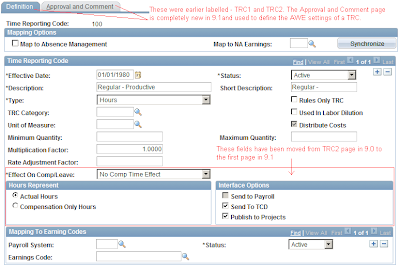
The setup component in Time and Labor that has changed significantly in 9.1 (more in terms of layout and additional features and less of fundamental data structure changes to the TL_TRC_TBL) is the TRC Setup page. Considering that the TRC is the fundamental building block of the module, it is imperative for us to understand the details of the change. The salient enhancements to the TRC Setup is as below:
 ------------------------------------------------------------------------------------------------
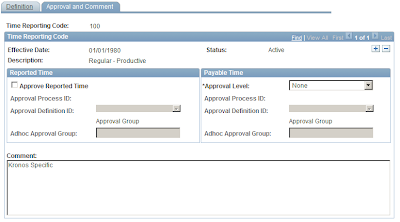 -------------------------------------------------------------------------------------------------
The major change as seen above is the introduction of the approval framewok settings. The adoption of AWE in Time and Labor has far fetched consequences, especially when one considers security and integration with Absence Management (it will now be imperative to synch up T&L security, Approval framework and Absence Approval framework). I am studying the technical architecture of the approval framework in T&L and will post about it in detail soon.
- A completely new page called 'Approvals and Comments' has added to the component. This is in conjunction with the introduction of the Approval Workflow Engine (AWE) framework in Time and Labor. The introduction of AWE is a major change and changes the way approvals are handled in Time and Labor. Earlier, the field called 'Approval Option' (where one could choose 'Reported Time', 'Payable Time' or 'None') controlled the way in which the TRC had to be approved. But this field has been taken off the page in 9.1 and a completely new page has been provided to fill in the AWE details for each TRC. This setup is similar to the familiar 'Country Take' setup in Absence Management, where we attach an Approval Process Id to each Absence Take that is exposed in Self Service.
- The fields that were present in the page called 'TRC2' in prior versions have been moved over to the first page of the definition. These fields include Effect on Comp/Leave, Hours Represent, Interface options etc.
- The tabs have been renamed to Definition and Approval and Comments from TRC1 and TRC2.
 ------------------------------------------------------------------------------------------------
 -------------------------------------------------------------------------------------------------
The major change as seen above is the introduction of the approval framewok settings. The adoption of AWE in Time and Labor has far fetched consequences, especially when one considers security and integration with Absence Management (it will now be imperative to synch up T&L security, Approval framework and Absence Approval framework). I am studying the technical architecture of the approval framework in T&L and will post about it in detail soon.
Peoplesoft 9.1 - Time and Labor: Changes to TRC Category Setup
TRC Category was introduced by Oracle in version 8.9 and I had written about it in a previous post. Oracle has given a face lift to this definition in 9.1 adding two new fields in the TRC Category definition - Reported Time Approval Display and Payable Time Approval Display. The new page is shown below:
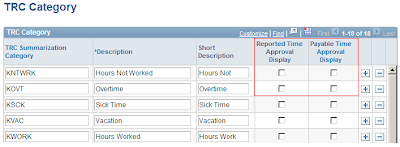
A maximum of three categories can be chosen to be displayed in the reported time and payable time approval pages. We can classify this change more as a cosmetic one impacting the layout of the time approval pages and the structure of the TRC Category changes - all in all, goes one small step in improving the usability of the application.

A maximum of three categories can be chosen to be displayed in the reported time and payable time approval pages. We can classify this change more as a cosmetic one impacting the layout of the time approval pages and the structure of the TRC Category changes - all in all, goes one small step in improving the usability of the application.
Peoplesoft 9.1 - Time and Labor: Viewing Unprocessed Time
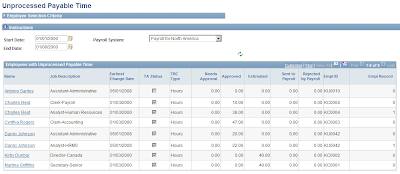
Oracle has strategically combined Time and Labor, Absence Management, NA Payroll and Payroll Interface into a category called 'Time and Pay' modules (interesting that Global Payroll has been maintained outside this classification!). One of the thrust areas of 9.0 as well as 9.1 has been about improving the integration and audit around these modules. Oracle took a visionary step in integrating absence self service into Time and Labor in 9.0, which I reckon is singularly the most important and useful feature upgrade from a T&L perspective after the changes to the schedule definition architecture in 8.9. For a shop that runs Absence Management, Time and Labor and Payroll for North America, the biggest challenge is to reconcile the interconnected data between the three modules - I've seen major glitches in the integration between Absence Management and Time and Labor in 8.9, which invariably leads to data inconsistency between the three modules and worse, has a negative impact in terms on Payroll compliance. While I expect much of the loose ends to be tied with the enhanced integration of Absence Management and T&L in 9.0 and above, it was really heartening to note that Oracle has provided two new pages to review unprocessed reported and payable time in 9.1. I am sure my folks in the payroll team would love that - to see which all rows did not get over to Payroll from Payable time and to see the rows in reported time not processed by Time Admin (it's not great drooling into PS Query reports all the time!).
The new pages can be found under the following navigation:
Time and Labor --> View Time --> View Unprocessed Time.
The page to view unprocessed payable time is given below:
 On the flip side - I am slightly let down by the fact that Oracle did not come out with more delivered reports in 9.1 - we are still stuck with the same old Time Card, Scheduled Hours, Payable Status and TCD Usage reports. Any area related to Payroll requires extensive reporting and auditing and it would be great for Oracle to come out with something like a Payroll dashboard that would integrate data between AM, T&L and NA Payroll. The job to audit the data consistency between these three modules is not straight forward and easy, while it is critical for business to get the numbers spot on - wouldn't it be wonderful to have an off the shelf suite to audit the entire payroll data and certify that what is being paid out is the correct amount? I would love to see that!
The new pages can be found under the following navigation:
Time and Labor --> View Time --> View Unprocessed Time.
The page to view unprocessed payable time is given below:
 On the flip side - I am slightly let down by the fact that Oracle did not come out with more delivered reports in 9.1 - we are still stuck with the same old Time Card, Scheduled Hours, Payable Status and TCD Usage reports. Any area related to Payroll requires extensive reporting and auditing and it would be great for Oracle to come out with something like a Payroll dashboard that would integrate data between AM, T&L and NA Payroll. The job to audit the data consistency between these three modules is not straight forward and easy, while it is critical for business to get the numbers spot on - wouldn't it be wonderful to have an off the shelf suite to audit the entire payroll data and certify that what is being paid out is the correct amount? I would love to see that!
Peoplesoft 9.1 - Time and Labor Rule Utilities
When I wrote my wish list for Time and Labor in April, one of the features I really wanted to see was a utility in T&L to migrate rules across environments, as currently it was a cumbersome process of writing manual export and import DMS scripts and manually recompiling all the rules in the target environment. I am really happy to note that Oracle has included that utility in the 9.1 release (surprising though that they never highlighted that feature in any of the pre-release announcements or transfer of information sessions). So what is new in 9.1 related to rule migration?
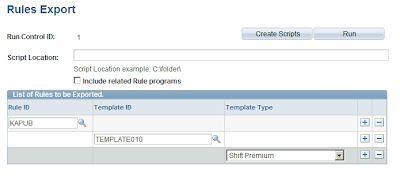
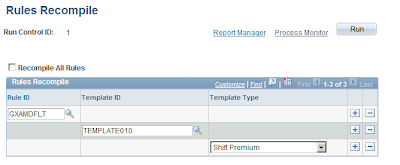
Oracle has introduced three new pages for exporting, importing and recompiling rules. This is pretty similar to the Rule Packager utility in Global Payroll and can be found under the familiar navigation of:
Setup HRMS --> System Administration --> Utilities --> Build Time and Labor rules.
The utility uses an Application Engine program to create DMS scripts in the location mentioned on the page. The utility used for exporting rules is shown below:
The page used for recompiling rules is shown below:
My thumps up to Oracle for providing these very needed utilities in 9.1 - this is something the developer community was longing for a long time. In hindsight, projects that are not yet on 9.1, should be looking at building a custom process mimicking the ones mentioned above to automate the process of T&L rule migration, may be I will write on this in detail sometime later.
Oracle has introduced three new pages for exporting, importing and recompiling rules. This is pretty similar to the Rule Packager utility in Global Payroll and can be found under the familiar navigation of:
Setup HRMS --> System Administration --> Utilities --> Build Time and Labor rules.
The utility uses an Application Engine program to create DMS scripts in the location mentioned on the page. The utility used for exporting rules is shown below:

The page used for recompiling rules is shown below:

My thumps up to Oracle for providing these very needed utilities in 9.1 - this is something the developer community was longing for a long time. In hindsight, projects that are not yet on 9.1, should be looking at building a custom process mimicking the ones mentioned above to automate the process of T&L rule migration, may be I will write on this in detail sometime later.
Subscribe to:
Posts (Atom)